Loading
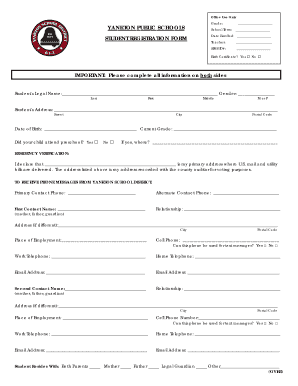
Get New Student Elementary Registration Forms - Yankton School District
How it works
-

Open form follow the instructions
-

Easily sign the form with your finger
-

Send filled & signed form or save
How to fill out the New Student Elementary Registration Forms - Yankton School District online
Completing the New Student Elementary Registration Forms for the Yankton School District online is a straightforward process. This guide aims to provide clear, step-by-step instructions to help users navigate the form efficiently.
Follow the steps to fill out the registration form with ease.
- Click ‘Get Form’ button to access the registration form and open it in your preferred editing tool.
- Begin by entering the student's legal name, providing first, middle, and last names. Confirm the student's gender by selecting 'M' or 'F'.
- Fill out the student's address including the street, city, and postal code. Provide the date of birth and current grade of the student.
- Indicate whether the student attended preschool by selecting 'Yes' or 'No'. If 'Yes', specify the name of the preschool.
- Provide residency verification by entering your primary address and confirming that it is recorded with the county auditor for voting purposes.
- Complete the primary and alternate contact information including names, phone numbers, and email addresses. Ensure that the primary contact can receive messages from the Yankton School District.
- List any school-aged siblings and any brothers or sisters not yet in school, including their grades and ages.
- If applicable, recount any previous school attendance by providing the last school attended, its address, and attendance dates.
- Answer the special education inquiries, noting if the student had an IEP or 504 Plan and whether they are currently receiving services.
- Provide migration-related information if applicable, noting if the family moved for agricultural employment.
- Sign and date the form, granting permission for the student to participate in school excursions and field trips.
- Finally, review your entries for completeness and accuracy, then save, download, print, or share the filled form as needed.
Start completing your New Student Elementary Registration Forms online today.
The great period of bookmark design and the use of luxuriant materials were during the Victorian and Edwardian eras. The idea that a bookmark be used to keep one's place and protect one's book caught on, and bookmarks have been produced in a variety of materials ever since.
Industry-leading security and compliance
US Legal Forms protects your data by complying with industry-specific security standards.
-
In businnes since 199725+ years providing professional legal documents.
-
Accredited businessGuarantees that a business meets BBB accreditation standards in the US and Canada.
-
Secured by BraintreeValidated Level 1 PCI DSS compliant payment gateway that accepts most major credit and debit card brands from across the globe.