Loading
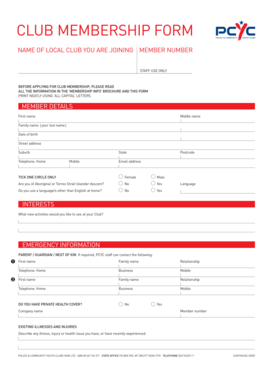
Get Pcyc Club Membership Form - Orange-p Schools Nsw Edu
How it works
-

Open form follow the instructions
-

Easily sign the form with your finger
-

Send filled & signed form or save
How to use or fill out the PCYC Club Membership Form - Orange-p Schools Nsw Edu online
Filling out the PCYC Club Membership Form online can be a straightforward process when you have the right guidance. This guide will assist you in completing each section of the form accurately and efficiently.
Follow the steps to complete your membership form effectively.
- Press the ‘Get Form’ button to access the form and open it in your preferred editor.
- Begin by entering your personal information in the 'Member Details' section. Fill in your first name, middle name, and family name using capital letters. Provide your date of birth, street address, suburb, state, postcode, home telephone, mobile number, and email address.
- In the section labeled 'Tick one circle only', select your gender by clicking on either 'Female' or 'Male'.
- Indicate whether you identify as Aboriginal or Torres Strait Islander by selecting 'Yes' or 'No'.
- If applicable, specify if you use a language other than English at home by ticking 'Yes' and indicating the language.
- In the 'Interests' section, list any new activities you would like to see offered at your Club.
- Fill out the 'Emergency Information' section with the contact details of a parent, guardian, or next of kin. Provide names, their relationship to you, and their phone numbers.
- Indicate if you have private health cover. If yes, provide the company name and member number if available.
- In the 'Existing Illnesses and Injuries' section, describe any health issues you currently have or have recently experienced.
- Review the 'Club Member Agreement', which outlines your understanding of conduct, privacy, and participation. Make sure to read through these carefully.
- Indicate your payment method for the annual membership fee and any donations you choose to make. Fill in the relevant details according to your selected payment option.
- Complete the 'Acceptance and Signature' section. Sign and date the form, ensuring that you have provided accurate information.
- If applicable, a parent or guardian should also sign and date the form if the applicant is under 18 years of age.
- Finally, save your changes, download or print the document for your records, and share it with the appropriate PCYC representative.
Complete your membership form online today to join the PCYC community.
Common Types of Footnotes Examples can include unexpected changes from the previous year, required disclosures, adjusted figures, accounting policy, etc. Footnotes may also contain notable future activities that are expected to have a significant impact on the company's future.
Industry-leading security and compliance
US Legal Forms protects your data by complying with industry-specific security standards.
-
In businnes since 199725+ years providing professional legal documents.
-
Accredited businessGuarantees that a business meets BBB accreditation standards in the US and Canada.
-
Secured by BraintreeValidated Level 1 PCI DSS compliant payment gateway that accepts most major credit and debit card brands from across the globe.