Loading
Get Sfn41263 Employer's Contribution And Wage Report 2015
How it works
-

Open form follow the instructions
-

Easily sign the form with your finger
-

Send filled & signed form or save
How to fill out the SFN41263 Employer's Contribution And Wage Report 2015 online
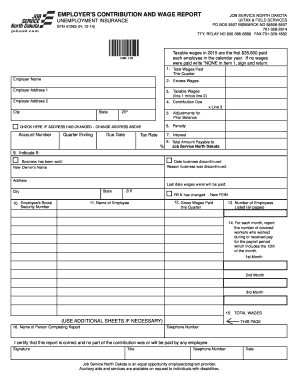
Filling out the SFN41263 Employer's Contribution And Wage Report 2015 online is a straightforward process that helps employers report their taxable wages and contributions accurately. This guide provides a step-by-step approach to ensure you complete the form correctly.
Follow the steps to complete your online submission of the form.
- Click ‘Get Form’ button to obtain the form and open it in the editor.
- Enter the employer name and address in the designated fields. Ensure the information is accurate to avoid any discrepancies.
- In Item 1, report the total wages paid during the quarter. If no wages were paid, write 'NONE'.
- Provide the amount of excess wages, if applicable, in Item 2. This is the amount that exceeds taxable wages.
- Calculate the taxable wages in Item 3 by subtracting Item 2 from Item 1. This amount will be used to determine contribution due.
- In Item 4, report the contribution due by multiplying the amount in Item 3 by the applicable tax rate.
- Indicate any penalties in Item 6 by completing the necessary fields if penalties apply.
- If your address has changed, check the appropriate box and update your employer address.
- Complete the items concerning business changes, including selling the business or discontinuing operations.
- Report employee details including their social security numbers and the gross wages paid for the quarter in Items 10-12.
- Indicate the total number of employees listed across all pages, ensuring all workers receiving wages are accounted for.
- For each month, report the number of covered workers who were employed during the payroll period including the 12th of the month in Item 14.
- Finally, provide your name, telephone number, and title in Item 16. Certify that the report is correct by signing where indicated.
- Once all sections are completed and reviewed, save the changes, and consider downloading or printing a copy for your records.
Complete your SFN41263 Employer's Contribution And Wage Report 2015 online today for an efficient submission.
What Makes A Good Logo? # A good logo is distinctive, appropriate, practical, graphic and simple in form, and it conveys the owner's intended message. A concept or “meaning” is usually behind an effective logo, and it communicates the intended message.
Industry-leading security and compliance
US Legal Forms protects your data by complying with industry-specific security standards.
-
In businnes since 199725+ years providing professional legal documents.
-
Accredited businessGuarantees that a business meets BBB accreditation standards in the US and Canada.
-
Secured by BraintreeValidated Level 1 PCI DSS compliant payment gateway that accepts most major credit and debit card brands from across the globe.