Loading
Get Wisconsin Quarterly Wage Report
How it works
-

Open form follow the instructions
-

Easily sign the form with your finger
-

Send filled & signed form or save
How to fill out the Wisconsin Quarterly Wage Report online
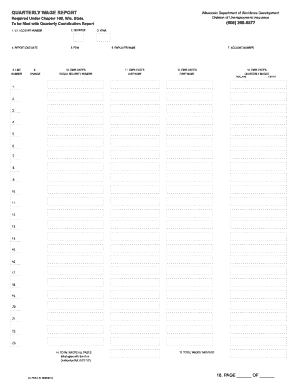
The Wisconsin Quarterly Wage Report is a crucial document for employers covered under the state's Unemployment Insurance Law. This guide provides a clear and detailed approach to filling out the form online, ensuring compliance and accuracy while reporting wages.
Follow the steps to complete the Wisconsin Quarterly Wage Report online
- Press the ‘Get Form’ button to access the Quarterly Wage Report form and open it in your preferred editing tool.
- Enter your U.I. account number in the designated field to identify your reporting account.
- Select the appropriate quarter for which you are reporting by entering 1, 2, 3, or 4.
- Input the 2-digit year (for example, 01 for 2001) to indicate the reporting year.
- Fill in the report due date to ensure timely submission.
- Enter your Federal Employer Identification Number (FEIN), which is essential for identification purposes.
- Provide your employer name in the specified field to confirm the reporting entity.
- List your 14-digit account number accurately to maintain proper records.
- Record the line number for each employee's wage entry, which ranges from 1 to 23, in the corresponding field.
- If the employee's social security number is not preprinted, enter it in the designated area. Ensure there are no dashes or diagonal lines.
- Input the employee's last name in all capital letters. Avoid using commas or periods.
- Type the employee's first name in all capital letters, omitting any middle initials.
- Enter the total wages paid to the employee during the quarter, ensuring to use a decimal point for cents without dollar signs.
- Summarize total wages for all pages in the appropriate field, confirming this amount matches the item on your Contribution Report.
- Calculate and input the total wages for all employees on the current page.
- Indicate the page number and total number of pages for your report.
- Upon completion, review your entries for accuracy and make any necessary corrections.
- Save your changes to the form and prepare for submission.
- Choose to download, print, or share the completed form as needed.
Complete your filing of the Wisconsin Quarterly Wage Report online today to ensure compliance and avoid penalties.
The minimum WBR is $54, requiring high quarter earnings of $1,350; and the maximum WBR is $370, requiring high quarter earnings of $9,250. If you do not have enough earnings for the minimum benefit rate, you do not qualify for unemployment benefits.