Loading
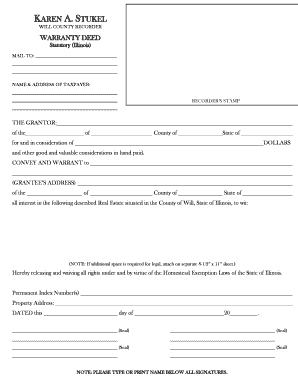
Get Warranty Deed - Will County Recorder
How it works
-

Open form follow the instructions
-

Easily sign the form with your finger
-

Send filled & signed form or save
How to fill out the Warranty Deed - Will County Recorder online
Filling out a warranty deed is an essential step in transferring property ownership. This guide will walk you through the process of completing the Warranty Deed form for the Will County Recorder online, ensuring that all necessary details are correctly provided.
Follow the steps to fill out the Warranty Deed - Will County Recorder online
- Click the ‘Get Form’ button to access the Warranty Deed form and open it in your preferred editing tool.
- Begin by entering the date you are filling out the form in the designated space.
- In the section labeled 'The Grantor', provide the names of the individuals or entities transferring the property.
- Fill out the 'Grantee’s Address' section with the complete address of the person or entity receiving the property.
- Specify the 'County of' and 'State of' for both the Grantor and Grantee.
- Indicate the total consideration amount in dollars for the transfer in the 'for and in consideration of' section.
- Describe the real estate being conveyed in the space provided, ensuring to include the Permanent Index Number(s) and property address.
- If additional space is needed for legal descriptions, attach a separate 8.5” x 11” sheet.
- Include any necessary signatures where indicated and remember to type or print names below each signature.
- After all information has been entered, save your changes, then download, print, or share the form as needed.
Complete your warranty deed online today and ensure a smooth property transfer.
The office of county recorder was created by the General Assembly in 1819. Recorders were charged with recording and filing all real estate deeds submitted to them, and with keeping a chronological entry book which listed them.