Loading
Get Karmasandhan
How it works
-

Open form follow the instructions
-

Easily sign the form with your finger
-

Send filled & signed form or save
How to fill out the Karmasandhan online
Filling out the Karmasandhan online can be a straightforward process when you understand each component of the form. This guide will walk you through the necessary steps to ensure that you complete the application accurately and efficiently.
Follow the steps to successfully complete your application.
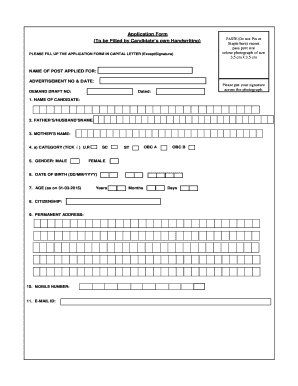
- Click ‘Get Form’ button to obtain the application form and open it in the designated editor.
- In the first section, paste your recent passport-sized color photograph (3.5 cm x 3.5 cm) in the specified area. Make sure to not pin or staple the photo.
- Enter the name of the post you are applying for in the designated field, along with the advertisement number and date.
- Fill in the demand draft number as required.
- Sign across your photograph to validate your application.
- Provide your name in the space marked 'Name of Candidate'.
- Enter your father’s or partner’s name and your mother’s name in the appropriate fields.
- Tick the appropriate category box to indicate your classification (e.g., U.R, SC, ST, OBC A, OBC B).
- Specify your gender by selecting the appropriate option (male or female).
- Fill in your date of birth in the format DD/MM/YYYY.
- Calculate your age as of 31-03-2015 and enter the years, months, and days in the corresponding fields.
- Indicate your citizenship status.
- Provide your permanent address in the designated area.
- Enter your mobile number.
- Include your email ID for further communication.
- Once all the fields are filled in accurately, you can save your changes, download a copy of the form, print it for your records, or share it as needed.
Start completing your application online today for a seamless submission experience.
A blank SAPS affidavit template can be downloaded below, filled in and stamped at any police station. The form can also be obtained from the police station and completed by hand.