Loading
Get Njpb Incident Report - Njconsumeraffairs
How it works
-

Open form follow the instructions
-

Easily sign the form with your finger
-

Send filled & signed form or save
How to fill out the NJPB INCIDENT REPORT - Njconsumeraffairs online
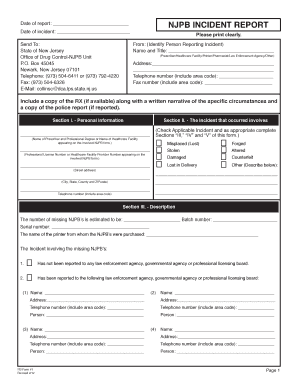
This guide provides step-by-step instructions on filling out the NJPB Incident Report. It is designed to assist users in accurately completing the form to ensure their incident is reported effectively.
Follow the steps to complete the NJPB Incident Report online.
- Locate and press the ‘Get Form’ button to access the NJPB Incident Report. This will allow you to fill out the form in an editable format.
- Fill in the 'Date of report' and 'Date of incident' fields accurately to specify when the report is being submitted and when the incident occurred.
- Provide the correct contact information for the person reporting the incident. Include their name, title, address, telephone number, and fax number.
- Identify the prescriber or healthcare facility's name, along with their professional degree or relevant identification number in Section I.
- In Section II, indicate the nature of the incident by checking the applicable box. If necessary, complete the relevant additional sections regarding the incident.
- Describe the incident in Section III. Include the number of missing NJPBs, batch number, serial number, and the name of the printer from whom the NJPBs were obtained.
- Detail whether the incident has been reported to law enforcement or any professional licensing board, and provide their contact information in Section III.
- In Section IV, list any involved individuals, including their names, addresses, telephone numbers, and dates of birth.
- Complete additional inquiries about arrest status and medication type, ensuring all relevant information is accurately entered.
- Fill in Section V with details on the pharmacies where the missing blanks were presented. Include the pharmacy names, addresses, and contact numbers.
- Conclude by providing your signature and title at the bottom of the form. Ensure all information is clearly printed.
- Once completed, review the entire report for accuracy before saving changes, downloading, printing, or sharing the form as needed.
Complete your NJPB Incident Report online to ensure accurate reporting and prompt attention to your case.
The preprinted name, category of licensure, license number, federal controlled substance registration number, and address of the prescribing practitioner. Check boxes on the form so that the prescriber may indicate the number of refills ordered. The date of origin of the prescription.