Loading
Get Objection To Admission Of Certificate Of Analysis
How it works
-

Open form follow the instructions
-

Easily sign the form with your finger
-

Send filled & signed form or save
How to fill out the Objection To Admission Of Certificate Of Analysis online
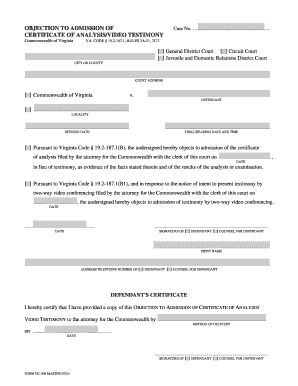
Filling out the Objection To Admission Of Certificate Of Analysis form is an important step for individuals who wish to challenge the admission of a certificate of analysis or video testimony in court. This guide provides clear and detailed instructions to assist users in completing this form online, ensuring that all necessary information is accurately submitted.
Follow the steps to accurately complete the form.
- Click 'Get Form' button to access the Objection To Admission Of Certificate Of Analysis form and open it in your document editor.
- Begin by entering the case number in the designated field at the top of the form. This number should match the case file associated with your situation.
- Select the appropriate court type by checking one of the boxes: General District Court, Circuit Court, or Juvenile and Domestic Relations District Court.
- Provide the name of the city or county related to your case in the corresponding field.
- Fill in the court address where your case is being heard. This should include all relevant address details.
- Enter the name of the defendant in the field marked 'Defendant'. Make sure to include full legal names.
- Provide the locality and offense date in the specified sections. These details are crucial for identifying the specifics of the case.
- Fill out the trial/hearing date and time as they are listed in your case documentation.
- Select the appropriate box to object to the admission of the certificate of analysis or video testimony, as applicable. Be sure to fill in the relevant date corresponding to when the certificate or notice was filed.
- Prepare to sign the form. If you are the defendant, select the box labeled 'Defendant' and sign in the provided space; alternatively, if you are the counsel for the defendant, check the relevant box and sign accordingly.
- Print your name clearly under your signature, and provide your address and telephone number in the designated areas, ensuring that you indicate whether this information belongs to the defendant or their counsel.
- Confirm that you have served a copy of the objection to the attorney for the Commonwealth and indicate the method of delivery in the available section, including the date this was completed.
- After completing the form, review all entered information for accuracy, save your changes, and then print or download the document for submission.
Complete your documents online today to ensure your objections are filed correctly and on time.
State your responses succinctly, being as specific as possible about the legal grounds for admissibility. Give a one-sentence non-legal explanation for the benefit of the jury. Accept the judge's ruling gracefully. Make an offer of proof if you lose the objection.
Industry-leading security and compliance
US Legal Forms protects your data by complying with industry-specific security standards.
-
In businnes since 199725+ years providing professional legal documents.
-
Accredited businessGuarantees that a business meets BBB accreditation standards in the US and Canada.
-
Secured by BraintreeValidated Level 1 PCI DSS compliant payment gateway that accepts most major credit and debit card brands from across the globe.