We use cookies to improve security, personalize the user experience, enhance our marketing activities (including cooperating with our marketing partners) and for other business use.
Click "here" to read our Cookie Policy. By clicking "Accept" you agree to the use of cookies. Read less
Read more
Accept
Loading
Form preview
  • US Legal Forms
  • Form Library
  • More Forms
  • More Uncategorized Forms
  • Transfer Form For Non Market Transactions

Get Transfer Form For Non Market Transactions

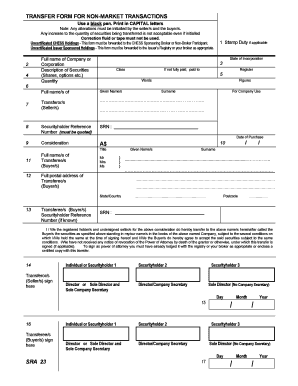
Tyholder 3 Sole Director (No Company Secretary) Day 17 Month / Year / HOW TO COMPLETE THE TRANSFER FORM FOR NON-MARKET TRANSACTIONS WHEN TRANSFERRING SECURITIES IN A LISTED OR UNLISTED COMPANY 1. STAMP DUTY Transfers of securities that are listed and quoted on an Australian Stock Exchange are exempt from stamp duty. However, Stamp Duty is payable on all other securities by the buyer of the shares and is based on the amount of consideration (refer 8). The stamp duty is calculated at the r.

How it works

  1. Open form

    Open form follow the instructions

  2. Easily sign form

    Easily sign the form with your finger

  3. Share form

    Send filled & signed form or save

How to fill out the Transfer Form For Non-Market Transactions online

This guide provides clear, step-by-step instructions on completing the Transfer Form For Non-Market Transactions online. Whether you are a first-time user or familiar with digital document management, this guide will assist you in filling out the form accurately and efficiently.

Follow the steps to fill out the Transfer Form For Non-Market Transactions effectively.

  1. Click the ‘Get Form’ button to access the Transfer Form For Non-Market Transactions and open it in your preferred digital editor.
  2. Fill in the stamp duty section if applicable. Note that transfers of listed securities are generally exempt from stamp duty, while other securities require the buyer to calculate and pay the duty based on the consideration value.
  3. In the 'Full name of Company or Corporation' field, enter the complete name of the entity holding the securities.
  4. Specify the state of incorporation for the company entered in the previous step.
  5. Describe the securities being transferred, such as shares or options, including any relevant identifiers.
  6. Input the quantity of securities being transferred, using both words and figures to ensure clarity.
  7. Complete the 'Full name/s of Transferor/s (Seller/s)' section by providing the full names of the sellers.
  8. Enter the Securityholder Reference Number (SRN) in the designated field, as this is critical for non-certificated securities.
  9. Detail the consideration amount for the securities, as this reflects the purchase price agreed upon by the parties.
  10. Record the date of purchase or the completion date of the transfer in the provided field.
  11. In the 'Full name/s of Transferee/s (Buyer/s)' section, include the full names of the buyers, ensuring compliance with naming regulations.
  12. Complete the 'Full postal address of Transferee/s' section with an accurate postal address, including the postcode.
  13. If applicable, input the existing SRN of the buyer for tracking purposes.
  14. Both sellers must sign the form where indicated. Ensure compliance with signing protocols, including joint holdings and roles such as power of attorney.
  15. Document the date signed by the sellers in the appropriate section.
  16. Buyers must sign in the indicated area, with note of joint holdings and associated signing requirements.
  17. Input the date signed by the buyers to finalize this section.
  18. Review the completed form for accuracy, ensuring all fields are filled correctly, and save your changes. You can then download, print, or share the document as needed.

Complete your Transfer Form For Non-Market Transactions online today for a smooth process.

Get form

Experience a faster way to fill out and sign forms on the web. Access the most extensive library of templates available.
Get form

Related content

Transferring your Brokerage Account: Tips on ......
Apr 16, 2009 — Many investors transfer their accounts from one brokerage firm to another...
Learn more
The Transfer of Shares in a Commercial Corporation...
Whichever form the transfer of shares may take, be it negotiation, assignment or ... of...
Learn more
Gross domestic product - Wikipedia
Gross domestic product (GDP) is a monetary measure of the market value of all the final...
Learn more

Related links form

School Choice Hardship Letter Sample. School Choice Hardship Letter Sample Plasticine: A Reconfigurable Architecture For Parallel Patterns Swasthya Sathi Application Form B Download Pdf Dr 832r

Questions & Answers

Get answers to your most pressing questions about US Legal Forms API.

Contact support

The Share Transfer Form (also called the Share Transfer Instrument) is a standard document required for the transfer of shares in a company. It is used when a shareholder intends to sell or transfer their company shares to another party.

Log on to CommSec, click on Settings and then head to the Service Centre. Select Transfer shares in the Service Request section. In the From drop down, select Share registry. ... The CommSec account you're transferring to must be in the same name (including salutation) and same address as what's registered for those shares.

An off-market transfer is a method for privately transferring shares between two shareholders without using the services of a share broking firm. Essentially, an off-market transfer is a change of ownership as the shares are not being publicly traded on the share market.

AUSTRALIAN STANDARD. TRANSFER FORM. FULL NAME OF. COMPANY. FULL. DESCRIPTION. OF. SECURITIES. QUANTITY. FULL. NAME(S) OF. TRANSFEROR(S)/ SELLER(S) CONSIDERATION. FULL. NAME(S) OF. TRANSFEREE(S)/ BUYER(S) FULL POSTAL. ADDRESS OF. ... TRANSFEROR(S)/ SELLER(S) SIGN HERE 4. Date Signed. TRANSFEREE(S)/ BUYER(S) SIGN HERE 4. Date Signed.

Get This Form Now!

Use professional pre-built templates to fill in and sign documents online faster. Get access to thousands of forms.
Get form
If you believe that this page should be taken down, please follow our DMCA take down processhere.

Industry-leading security and compliance

US Legal Forms protects your data by complying with industry-specific security standards.
  • In businnes since 1997
    25+ years providing professional legal documents.
  • Accredited business
    Guarantees that a business meets BBB accreditation standards in the US and Canada.
  • Secured by Braintree
    Validated Level 1 PCI DSS compliant payment gateway that accepts most major credit and debit card brands from across the globe.
Get Transfer Form For Non Market Transactions
Get form
Form Packages
Adoption
Bankruptcy
Contractors
Divorce
Home Sales
Employment
Identity Theft
Incorporation
Landlord Tenant
Living Trust
Name Change
Personal Planning
Small Business
Wills & Estates
Packages A-Z
Form Categories
Affidavits
Bankruptcy
Bill of Sale
Corporate - LLC
Divorce
Employment
Identity Theft
Internet Technology
Landlord Tenant
Living Wills
Name Change
Power of Attorney
Real Estate
Small Estates
Wills
All Forms
Forms A-Z
Form Library
Customer Service
Terms of Service
Privacy Notice
Legal Hub
Content Takedown Policy
Bug Bounty Program
About Us
Help Portal
Legal Resources
Blog
Affiliates
Contact Us
Delete My Account
Site Map
Industries
Forms in Spanish
Localized Forms
State-specific Forms
Forms Kit
Legal Guides
Real Estate Handbook
All Guides
Prepared for You
Notarize
Incorporation services
Our Customers
For Consumers
For Small Business
For Attorneys
Our Sites
US Legal Forms
USLegal
FormsPass
pdfFiller
signNow
airSlate WorkFlow
DocHub
Instapage
Social Media
Call us now toll free:
+1 833 426 79 33
As seen in:
  • USA Today logo picture
  • CBC News logo picture
  • LA Times logo picture
  • The Washington Post logo picture
  • AP logo picture
  • Forbes logo picture
© Copyright 1997-2025
airSlate Legal Forms, Inc.
3720 Flowood Dr, Flowood, Mississippi 39232
Form Packages
Adoption
Bankruptcy
Contractors
Divorce
Home Sales
Employment
Identity Theft
Incorporation
Landlord Tenant
Living Trust
Name Change
Personal Planning
Small Business
Wills & Estates
Packages A-Z
Form Categories
Affidavits
Bankruptcy
Bill of Sale
Corporate - LLC
Divorce
Employment
Identity Theft
Internet Technology
Landlord Tenant
Living Wills
Name Change
Power of Attorney
Real Estate
Small Estates
Wills
All Forms
Forms A-Z
Form Library
Customer Service
Terms of Service
Privacy Notice
Legal Hub
Content Takedown Policy
Bug Bounty Program
About Us
Help Portal
Legal Resources
Blog
Affiliates
Contact Us
Delete My Account
Site Map
Industries
Forms in Spanish
Localized Forms
State-specific Forms
Forms Kit
Legal Guides
Real Estate Handbook
All Guides
Prepared for You
Notarize
Incorporation services
Our Customers
For Consumers
For Small Business
For Attorneys
Our Sites
US Legal Forms
USLegal
FormsPass
pdfFiller
signNow
airSlate WorkFlow
DocHub
Instapage
Social Media
Call us now toll free:
+1 833 426 79 33
As seen in:
  • USA Today logo picture
  • CBC News logo picture
  • LA Times logo picture
  • The Washington Post logo picture
  • AP logo picture
  • Forbes logo picture
© Copyright 1997-2025
airSlate Legal Forms, Inc.
3720 Flowood Dr, Flowood, Mississippi 39232