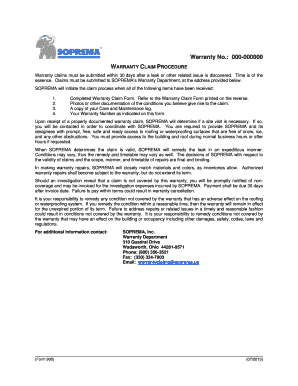
Get Warranty Claim Procedure_form 900 - Soprema - Soprema
How it works
-

Open form follow the instructions
-

Easily sign the form with your finger
-

Send filled & signed form or save
How to fill out the Warranty Claim Procedure_Form 900 - Soprema - Soprema online
Submitting a warranty claim is a crucial step in addressing any issues with your roofing or waterproofing system. This guide will help you navigate the Warranty Claim Procedure_Form 900 from Soprema, ensuring you complete the form accurately and efficiently for the best possible outcome.
Follow the steps to successfully complete the warranty claim form.
- Press the ‘Get Form’ button to access the Warranty Claim Procedure_Form 900 and open it in your online document editor.
- Fill in the date of your claim at the top of the form. This date is important as warranty claims must be submitted within 30 days of discovering a leak or related issue.
- Enter your warranty number exactly as it appears on your warranty documentation. This is vital for identifying your specific claim.
- Complete the owner name and contact information fields, including email and phone number. Ensure all information is current and accurate to facilitate communication.
- Provide the building name and address details. This includes the state, city, and zip code where the issue is present.
- Document the name and contact details of the individual responsible for the building. This person should be available for contact regarding the claim.
- Indicate whether you have reviewed the Claim Procedure before submitting the claim by selecting either 'YES' or 'NO'.
- Confirm if there is a roofing or waterproofing system leak related to this claim by selecting 'YES' or 'NO'. If 'YES', provide the date when the leak was discovered.
- Note if the roof has been inspected since the leak's discovery by answering 'YES' or 'NO'. If 'YES', include the name of the inspector and the date of inspection.
- Indicate whether you have a Care and Maintenance Log available by answering 'YES' or 'NO'.
- In the 'Location and description of problem' section, detail the issues and conditions that prompted this claim. Include any additional information that supports your claim.
- Sign and date the form in the designated area to validate your claim.
- Finally, return the completed form via email or fax as instructed, ensuring it is submitted within two business days.
Start your warranty claim process online now by completing the Warranty Claim Procedure_Form 900.
0:24 1:17 How To Turn Link Into Bookmark In Google Chrome [Tutorial] - YouTube YouTube Start of suggested clip End of suggested clip So let's just say Wikipedia let's say I want to search 10 on Wikipedia. Here. And I'm just open itMoreSo let's just say Wikipedia let's say I want to search 10 on Wikipedia. Here. And I'm just open it up. Let's say I want to make the Spanish Wikipedia page a bookmark.
Industry-leading security and compliance
-
In businnes since 199725+ years providing professional legal documents.
-
Accredited businessGuarantees that a business meets BBB accreditation standards in the US and Canada.
-
Secured by BraintreeValidated Level 1 PCI DSS compliant payment gateway that accepts most major credit and debit card brands from across the globe.