Loading
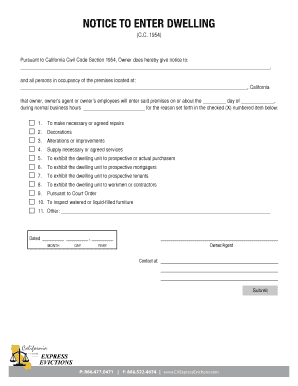
Get Notice To Enter Dwelling
How it works
-

Open form follow the instructions
-

Easily sign the form with your finger
-

Send filled & signed form or save
How to fill out the Notice To Enter Dwelling online
Filling out the Notice To Enter Dwelling form online is an essential task for property owners and their agents. This guide provides a clear and supportive approach to help you navigate each component of the form effortlessly.
Follow the steps to complete the form accurately.
- Press the ‘Get Form’ button to access the form and open it in your preferred online editor.
- In the first blank section, enter the full name of the individual or individuals being notified about the entry. This should include all persons occupying the premises.
- Next, input the complete address of the premises where entry will occur, ensuring to include all necessary details, such as the street address and city, followed by 'California.'
- Indicate the date planned for entry by filling in the day and month in the respective blanks, as well as the year in the final space for the date.
- Specify the time frame for the entry by filling in the designated field with the appropriate normal business hours.
- Select the appropriate reason for entry by marking an 'X' next to one of the numbered options provided, such as making repairs or inspecting furnishings.
- If applicable, complete the 'Other' section by providing a detailed description of any other reason for entry that was not listed.
- Finalize the form by signing in the space designated for the owner or agent's name, ensuring your signature is clear.
- Provide contact information by completing the section for your phone number, email, or other relevant contact method.
- Once all sections are completed, save your changes, and specify if you want to download, print, or share the form with others.
Complete your Notice To Enter Dwelling form online today for easy and efficient management.
First of all, despite what tenants might believe or say, they cannot 'refuse' entry if all the legislative requirements are met. This means little though if the tenant is physically blocking entry. If the tenant is displaying aggressive behaviour when you lawfully attempt to enter remove yourself from the situation.