Loading
Get Appointment Of Dhhs As Agent For State And Federal Employment ...
How it works
-

Open form follow the instructions
-

Easily sign the form with your finger
-

Send filled & signed form or save
How to fill out the Appointment Of DHHS As Agent For State And Federal Employment Taxes online
This guide aims to assist users in understanding how to fill out the Appointment Of DHHS As Agent For State And Federal Employment Taxes form online. By following these clear steps, you can efficiently complete the process, ensuring your appointment or revocation is properly documented.
Follow the steps to fill out the form correctly.
- Click ‘Get Form’ button to access the form and open it in your selected editing platform.
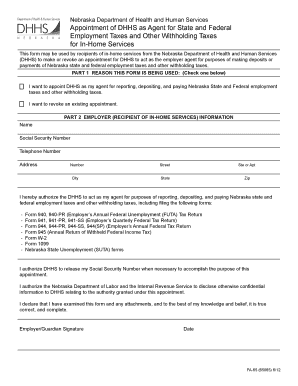
- In Part 1, indicate your reason for using the form by checking one of the provided boxes: either to appoint DHHS as your agent or to revoke an existing appointment.
- In Part 2, provide your information as the employer or recipient of in-home services. Fill in your full name, Social Security Number, telephone number, and address details including street number, city, state, and zip code.
- Review the authorization section where you are granting DHHS permission to act as your agent for tax-related purposes.
- Acknowledge your understanding of the implications by signing and dating the form in the designated spaces.
- Once all fields are completed, you may save changes, download, print, or share the form as needed.
Complete your documents online today for a seamless process.
The employer determines the amount of withholding based upon the employee's information provided through the Form W-4. Factors that make up the calculation for withholding tax include filing status, number of exemptions, and amount of semi-monthly gross earnings.
Industry-leading security and compliance
US Legal Forms protects your data by complying with industry-specific security standards.
-
In businnes since 199725+ years providing professional legal documents.
-
Accredited businessGuarantees that a business meets BBB accreditation standards in the US and Canada.
-
Secured by BraintreeValidated Level 1 PCI DSS compliant payment gateway that accepts most major credit and debit card brands from across the globe.