Loading
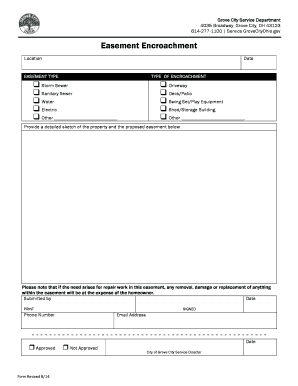
Get Easement Encroachment Form - Grove City
How it works
-

Open form follow the instructions
-

Easily sign the form with your finger
-

Send filled & signed form or save
How to fill out the Easement Encroachment Form - Grove City online
Filling out the Easement Encroachment Form for Grove City can be straightforward with the right guidance. This document is essential for homeowners who need permission for encroachments in designated easements.
Follow the steps to complete the form accurately and efficiently.
- Press the ‘Get Form’ button to access the Easement Encroachment Form. This will open the document in your preferred digital editor.
- Begin by entering the location of the easement. Provide a clear and specific address to avoid any confusion.
- Next, enter the date on which you are submitting the form. This helps in tracking and processing your request.
- Select the type of easement from the provided options. You can choose from storm sewer, sanitary sewer, water, electric, or specify another type if needed.
- Indicate the type of encroachment you are requesting permission for, such as a driveway, deck/patio, swing set/play equipment, or shed/storage building. If applicable, mention any other type of encroachment.
- Provide a detailed sketch of your property along with the proposed easement. This visual representation should clearly show where the encroachment will occur.
- Be aware that if any repair work is required within the easement, the homeowner will be responsible for any removal, damage, or replacement costs.
- Complete the submitted by section, entering your name, date, phone number, and email address. Ensure all information is accurate for effective communication.
- After reviewing the information you have provided, save the changes to the document. You may then download, print, or share the form as needed.
Take action now and complete your Easement Encroachment Form online to facilitate your property needs.