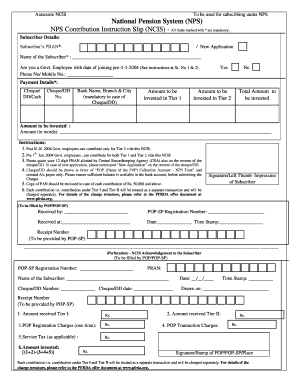
Annexure NCIS To be used for subscribing under NPS National Pension System NPS NPS Contribution Instruction Slip NCIS - All fields marked with are mandatory. Subscriber Details Subscriber s PRAN / New Application Name of the Subscriber Are you a Govt* Employee with date of joining pre-1-1-2004 See instructions at Sr. No 1 2 Phone No/ Mobile No* Yes No Payment Details Cheque/ DD/Cash No* Bank Name Branch City mandatory in case of Amount to be invested in Tier 1 Total Amount to be invested Amount to be invested Amount in words Instructions 1. Post 01. 01. 2004 Govt* employees can contribute only for Tier 2 vide this NCIS* 2. Pre 1st Jan 2004 Govt* employees can contribute for both Tier 1 and Tier 2 vide this NCIS 3. Please quote your 12 digit PRAN allotted by Central Recordkeeping Agency CRA also on the reverse of the cheque/DD. In case of new application please mentioned New Application on the reverse of the cheque/DD. 4. Cheque/DD should be drawn in favor of POP Name of the POP Collect....
Open form follow the instructions
Easily sign the form with your finger
Send filled & signed form or save
How to fill out the Pan Card Form Pdf online
Filling out the Pan Card Form Pdf online can streamline the process of applying for your Permanent Account Number. This guide provides step-by-step instructions to help you complete the form accurately and efficiently.
Follow the steps to fill out the form correctly.
- Click 'Get Form' button to obtain the form and open it in the editor.
- In the Subscriber Details section, enter your PRAN in the designated field. If you are applying as a new subscriber, make sure to indicate 'New Application.'
- Provide your name in the 'Name of the Subscriber' field. Ensure that it matches your official documents.
- Indicate your employment status by selecting 'Yes' or 'No' regarding whether you are a Government employee who joined before January 1, 2004.
- Enter your phone number or mobile number in the corresponding field for contact purposes.
- In the Payment Details section, select your payment method: Cheque, DD, or Cash.
- If paying by Cheque or DD, fill out the Cheque/DD number, along with the bank's name, branch, and city.
- Specify the amounts to be invested in Tier 1 and Tier 2 sections, including the total amount you wish to contribute.
- Type out the amount in words as required.
- If necessary, attach a copy of your PAN if your cash contribution is Rs. 50,000 or more.
- Sign or place your left thumb impression in the designated area to authenticate the document.
- Finally, review all the information for accuracy, then save your changes and download the completed form, or print it for submission.
Complete your application by filling out the document online today!
Experience a faster way to fill out and sign forms on the web. Access the most extensive library of templates available.
Related content
Feb 4, 2014 — India: The Permanent Account Number (PAN) card; procedure to obtain a...
Kumari M/s Last Name / Surname First Name Middle Name 2 Abbreviation of the above name, as...
Open the PDF directly: View PDF PDF . ... INSTRUCTIONS FOR FILLING FORM 49A (a) Form to be...
Get answers to your most pressing questions about US Legal Forms API.
How can I get PAN card PDF?
Step 1: Visit NSDL PAN portal to download the PAN card by Acknowledgement number. step 3: Enter the OTP and click on the Validate button to download your ePAN. Step 4: Click on Download PDF to download the ePAN instantly.
How can I print my PAN card?
Visit https://www.tin-nsdl.com/. Click on 'Reprint of PAN card' on the homepage. In case you are unable to find the link on the homepage, you can click on 'Services' and choose 'PAN' after which you will be redirected to a new page. Here, you will have to click on 'Reprint of PAN card'.
What is Pan in income tax?
Permanent Account N umber (PAN) is a ten-digit alphanumeric number, issued in the form of a laminated card, by the Income Tax Department, to any "person" who applies for it or to whom the department allots the number..
How can I download my PAN card by name and date of birth?
On the e-Filing website, click on Know Your PAN . Enter your Date of Birth or Date of incorporation in DD/MM/YYYY format. Enter your surname first, then enter your middle name and first name. Enter the Captcha Code as shown on the screen. Click on submit. You will Receive the Following Details:
How can I get PAN card password?
Please note that the pdf document is password protected to ensure it is accessed by the appropriate user. The password is a combination of the PAN number (lowercase alphabet) and the date of birth in the format ddmmyyyy.
How can I download my PAN card application?
Step 1: Visit NSDL PAN portal to download the PAN card by Acknowledgement number. step 3: Enter the OTP and click on the Validate button to download your ePAN. Step 4: Click on Download PDF to download the ePAN instantly.
How can I download PAN application form?
Taxpayers now can easily download the PAN Card online by following the below-mentioned steps: Step 1: Visit the official website of https://www.myutiitsl.com/PAN_ONLINE/PANApp. Step 2: Select Both Physical PAN Card and e-PAN and enter the further details carefully and click Submit
What are the documents required to apply pan card?
Voter's ID card. Passport. Aadhar card. Ration card having Applicant's photo. Driving License. Photo ID card which are issued by central government, state government or any undertaking of public sector
What is Pan card form?
PAN Card Application Form Different PAN application forms are to be used for Indian applicants and non-Indian applicants. Form 49A is for Indian Applicants and form 49AA for non-Indian applicants. Forms can be downloaded from the PAN UTIITSL website. ... Form has to be sent to the NSDL office with self-attested documents.
What is Pan application form?
PAN Card Application Form Different PAN application forms are to be used for Indian applicants and non-Indian applicants. Form 49A is for Indian Applicants and form 49AA for non-Indian applicants. Forms can be downloaded from the PAN UTIITSL website. ... Form has to be sent to the NSDL office with self-attested documents.
Use professional pre-built templates to fill in and sign documents online faster. Get access to thousands of forms.
If you believe that this page should be taken down, please follow our DMCA take down process here.