Loading
Get Client Registration Form Daas 101 (long Form) - Ncdhhs
How it works
-

Open form follow the instructions
-

Easily sign the form with your finger
-

Send filled & signed form or save
How to fill out the CLIENT REGISTRATION FORM DAAS 101 (Long Form) - Ncdhhs online
This guide provides a comprehensive walkthrough for completing the CLIENT REGISTRATION FORM DAAS 101 (Long Form) online, ensuring you understand each section's requirements. By following these instructions, you can effectively provide the necessary information, facilitating quicker service processing.
Follow the steps to accurately complete the form.
- Click ‘Get Form’ button to obtain the CLIENT REGISTRATION FORM DAAS 101 (Long Form) and open it in your chosen editor.
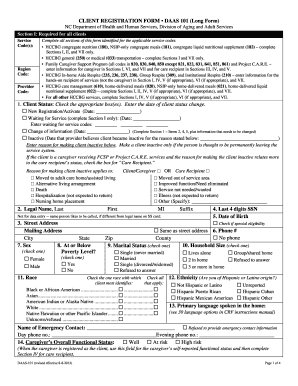
- Section I requires details mandatory for all clients. Fill out the service code(s), region code, and provider code as applicable to your situation. Ensure accuracy to avoid delays.
- In the client status section, check the appropriate box to indicate whether this is a new registration, waiting for service, a change of information, or an inactive status. Record relevant dates and reasons.
- Complete the legal name section by providing the last name, first name, middle initial, suffix, and the last four digits of the Social Security Number along with the date of birth.
- In the address section, provide the street address, city, state, zip code, and county. Indicate if the mailing address is the same as the street address.
- Fill in the poverty level, household size, sex, and marital status as per your circumstances. This information is crucial for eligibility assessment.
- Indicate your race and ethnicity by selecting the options that apply. Be mindful to check only the one race you most identify with.
- Provide details about the primary language spoken in the home and the name of the person you would like to be called if different from the legal name.
- Section II is required for specific nutrition-related services. Answer the nutrition health score questions regarding your eating habits and any conditions affecting your nutrition.
- Section III is specifically for care recipients. Here, fill in the details regarding the care recipient's name, date of birth, sex, and any essential qualifiers regarding their disabilities.
- In Section IV, indicate tasks related to daily living that the client or care recipient can manage independently. This helps assess the level of assistance needed.
- Provide information on the hours of care, care provided, and the primary caregiver’s relationship to the recipient in Section V.
- Section VI pertains to the primary caregiver’s self-reported health and stress levels, along with employment status. Complete this section fully.
- Lastly, in Section VII, confirm your understanding and consent by signing and dating where indicated. This section is required for all clients.
- Once completed, remember to save your changes and you may choose to download, print, or share the completed CLIENT REGISTRATION FORM DAAS 101 (Long Form) as necessary.
Take action today by filling out the CLIENT REGISTRATION FORM DAAS 101 (Long Form) online to access essential services.