Loading
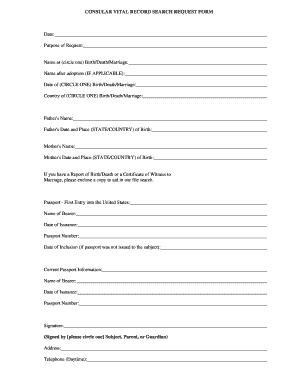
Get Consular Vital Record Search Request Form
How it works
-

Open form follow the instructions
-

Easily sign the form with your finger
-

Send filled & signed form or save
How to fill out the CONSULAR VITAL RECORD SEARCH REQUEST FORM online
This guide provides a clear and detailed approach to completing the Consular Vital Record Search Request Form online. By following these steps, users can efficiently submit their request for vital records.
Follow the steps to complete your form accurately
- Click ‘Get Form’ button to access the form and open it in your preferred editing tool.
- Begin by filling out the date and purpose of your request. Make sure to provide accurate dates, as this information is critical for the processing of your request.
- In the section for ‘Name at (circle one) Birth/Death/Marriage,’ indicate the appropriate name based on the selected document type. If applicable, provide the name after adoption in the designated field.
- Fill in the ‘Date of (CIRCLE ONE) Birth/Death/Marriage’ field with the exact date relevant to the selected document type. Similarly, complete the ‘Country of (CIRCLE ONE) Birth/Death/Marriage’ field.
- Provide the names and dates of birth for both parents in the respective sections, ensuring you specify the state and country for their place of birth.
- If you possess a Report of Birth/Death or a Certificate of Witness to Marriage, include a copy to facilitate the search process.
- Complete the sections regarding your passport details. Enter the name of the bearer, the date of issuance, the passport number, and the date of inclusion if the passport was not issued directly to the subject.
- Fill out the current passport information similarly, ensuring all details match the relevant documents.
- Sign the form in the designated signature area. Circle the appropriate designation to indicate whether the signature is from the subject, parent, or guardian.
- Provide your address and a daytime telephone number. This information will be used for any follow-up or clarifications.
- Indicate the total number of documents you wish to request and calculate the corresponding payment amount based on the costs outlined in the form. Ensure that your payment is made via check or money order, payable in U.S. dollars to the Department of State.
- Once you have completed the form, review all entries for accuracy. Save your changes and download the completed form for your records. You may also choose to print and send it to the applicable address.
Start completing your documents online to ensure you have vital records efficiently processed.
Report of Birth Abroad of a U.S. Citizen (FS-240) State Department Certification of Birth (FS-545 or DS-1350)