Loading
Get Ky Form 720v
How it works
-

Open form follow the instructions
-

Easily sign the form with your finger
-

Send filled & signed form or save
How to fill out the Ky Form 720v online
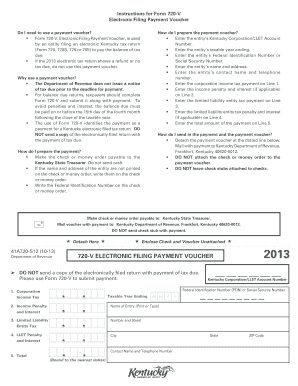
Filling out the Ky Form 720v, also known as the Electronic Filing Payment Voucher, is a crucial step for entities required to pay Kentucky taxes. This guide will walk you through the process of completing the form electronically, ensuring that your filing is accurate and timely.
Follow the steps to successfully complete the Ky Form 720v online.
- Click ‘Get Form’ button to obtain the form and open it in the editor.
- Enter the entity’s Kentucky Corporation/LLET Account Number in the designated field.
- Fill in the taxable year ending date for the entity.
- Input the entity’s Federal Identification Number or Social Security Number correctly.
- Provide the entity’s name and complete mailing address.
- Enter the contact name and telephone number for the entity.
- On Line 1, enter the corporation income tax payment amount.
- If applicable, input the income penalty and interest on Line 2.
- On Line 3, fill in the limited liability entity tax payment.
- If applicable, enter the limited liability entity tax penalty and interest on Line 4.
- Calculate and write the total amount of the payment on Line 5.
- Detach the payment voucher at the dotted line and ensure the payment is not attached to the voucher.
- Print, save any changes, and prepare the envelope to send the voucher with payment to the Kentucky Department of Revenue.
Complete your Ky Form 720v online today for a smooth filing experience!
If the Kentucky Corporation/LLET Account Number is not known, contact Registration at (502) 564 3306.