Loading
Get Faa Form 8420 8
How it works
-

Open form follow the instructions
-

Easily sign the form with your finger
-

Send filled & signed form or save
How to fill out the Faa Form 8420 8 online
Filling out the Faa Form 8420 8 online can be an essential step in obtaining or renewing a pilot school certificate. This guide provides clear, step-by-step instructions to help you navigate the form efficiently and accurately.
Follow the steps to complete your application successfully.
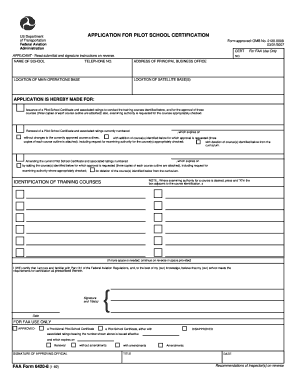
- Click ‘Get Form’ button to obtain the form and open it in the editor.
- Begin by entering the name of the school at the appropriate section. Ensure that the name is accurate and corresponds with your official documentation.
- Fill in the address of the principal business office. This must be a complete address where the school can be contacted.
- Provide a telephone number where the school can be reached. Ensure this number is current and accessible.
- Indicate the location of any satellite bases and the main operations base on the form. Each location must be clearly specified.
- Select the type of application you are submitting: issuance, renewal, or amendment of the pilot school certificate. Carefully check the box next to the appropriate option.
- For the identification of training courses, list the courses associated with your application. If additional space is required, continue on the provided reverse side.
- Certify your knowledge of Part 141 of the Federal Aviation Regulations by signing and dating the form. Ensure the signature represents the proper authority as outlined in the instructions.
- Once all fields are completed, review the form for accuracy. It is important to ensure that all information is correct before submitting.
- Finally, save your changes, download a copy for your records, print the form if necessary, or share it with the appropriate FAA district office.
Complete your Faa Form 8420 8 online today for a smooth application process.
Form FAA 8110-3 - Determination of Compliance with Airworthiness Standards.