Loading
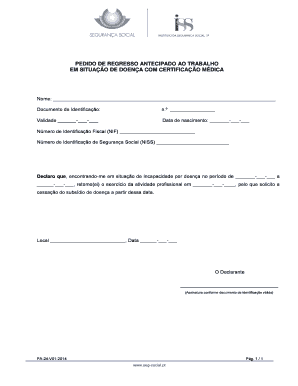
Get Model Pa 24 V01 2014
How it works
-

Open form follow the instructions
-

Easily sign the form with your finger
-

Send filled & signed form or save
How to fill out the Model Pa 24 V01 2014 online
The Model Pa 24 V01 2014 is an important document used to request early return to work following a medical condition. This guide will provide you with step-by-step instructions to help you complete this form online with ease.
Follow the steps to successfully complete the Model Pa 24 V01 2014 online.
- Click ‘Get Form’ button to obtain the document and open it in your online editor.
- Fill in your full name in the designated field at the top of the form.
- Provide your identification document number along with its validity date in the specified fields.
- Enter your date of birth accurately in the given format.
- Input your tax identification number (Número de Identificação Fiscal) in the space provided.
- Record your social security identification number (Número de Identificação de Segurança Social) in the appropriate field.
- Declare your incapacity by specifying the dates of your illness in the stating period section.
- Indicate the intended date of returning to work in the corresponding area.
- Complete the location and date fields at the bottom of the form.
- Sign the form in the designated area, matching your signature to your identification document.
- Review all entered information for accuracy. Once confirmed, you can save the completed form, download, print, or share it as needed.
Complete and submit your Model Pa 24 V01 2014 online today.