Loading
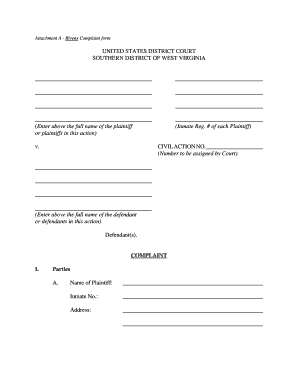
Get Bivens Complaint Form - Wvsd Uscourts
How it works
-

Open form follow the instructions
-

Easily sign the form with your finger
-

Send filled & signed form or save
How to fill out the Bivens Complaint Form - Wvsd Uscourts online
This guide provides a straightforward approach to filling out the Bivens Complaint Form for users in the Southern District of West Virginia. Whether you have legal experience or not, these detailed instructions will assist you in submitting your complaint effectively.
Follow the steps to complete your Bivens Complaint Form online.
- Press the ‘Get Form’ button to access the Bivens Complaint Form and open it in the online editor.
- Begin by entering the full name of the plaintiff or plaintiffs in the action at the designated space. If there are multiple plaintiffs, provide their names accordingly.
- Next, fill in the inmate registration number for each plaintiff, followed by their addresses in the specified fields.
- In the section labeled ‘Defendant(s),’ enter the full name of each defendant involved in the case. You will also need to specify their position and place of employment.
- Indicate the name of the prison or institution where the plaintiff is currently confined. Confirm whether the events related to the complaint took place there by checking ‘Yes’ or ‘No.’
- If the events did not occur in the place of confinement, provide details about the actual location where the incidents happened.
- Answer the questions about the existence of a prisoner grievance procedure and whether you have taken your complaint through that process. If applicable, explain any reasons for not using it.
- In the ‘Previous Lawsuits’ section, indicate if there have been related lawsuits and provide the required details, including parties involved, court information, docket number, and disposition.
- Under ‘Statement of Claim,’ briefly outline the facts of your case, detailing the actions of each defendant that led to the claimed constitutional violations. Use separate paragraphs for multiple claims if necessary.
- Finally, in the ‘Relief’ section, clearly state what you are requesting the Court to do for you, avoiding any legal jargon or citations.
- Sign and date the form, certifying that the information provided is accurate and true under penalty of perjury.
- Once all sections are completed, save your changes, then choose to download, print, or share the completed form as needed.
Complete your Bivens Complaint Form online today to ensure that your concerns are officially conveyed.