Loading
Get Betriebsvordrucke
How it works
-

Open form follow the instructions
-

Easily sign the form with your finger
-

Send filled & signed form or save
How to fill out the Betriebsvordrucke online
Filling out the Betriebsvordrucke can be a straightforward process, whether you're familiar with such documents or new to them. This guide will provide you with clear instructions to ensure accurate completion of the form.
Follow the steps to fill out your Betriebsvordrucke with ease.
- Click ‘Get Form’ button to access the Betriebsvordrucke, which will open the necessary form in your online editing tool.
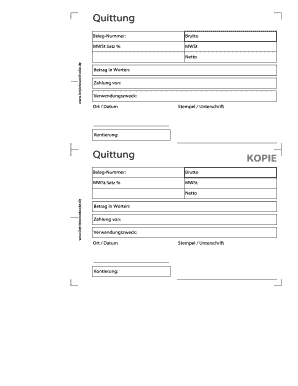
- Begin by entering the 'Beleg-Nummer' in the designated field. This is your unique document number that identifies the specific transaction.
- In the 'Brutto' section, provide the total gross amount of the transaction before any deductions.
- Fill in the 'MWSt Satz %' field with the applicable tax rate as a percentage. Ensure this rate reflects the current tax regulations.
- In the 'MWSt' area, calculate and enter the value of the value-added tax based on the gross amount and tax rate you provided.
- Write the net amount in the 'Netto' field; this is the gross amount minus the tax you calculated.
- In the 'Betrag in Worten' section, express the net amount in words for clarity and to prevent errors.
- For the 'Zahlung von' field, provide the name of the person or entity making the payment.
- Complete the 'Verwendungszweck' section, detailing the purpose of the payment to ensure proper tracking and identification.
- Enter the 'Ort / Datum,' which indicates the location and date of the transaction.
- If applicable, apply a stamp or signature in the designated area to authenticate the document.
- Check the 'Kontierung' field to verify any accounting categorizations required for record-keeping.
- Once you have filled in all necessary fields, you can save your changes, download a copy, print the form, or share it as needed.
Complete your Betriebsvordrucke online today and streamline your documentation process!