Loading
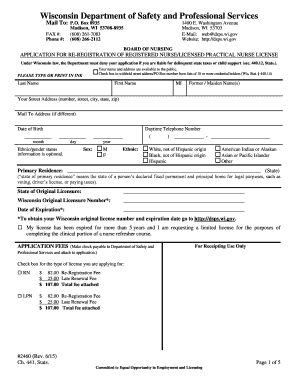
Get 02/26/13 #2460 App For Reregistration Of Rn/lpn License - Dsps Wi
How it works
-

Open form follow the instructions
-

Easily sign the form with your finger
-

Send filled & signed form or save
How to fill out the 02/26/13 #2460 App For Reregistration Of RN/LPN License - Dsps Wi online
This guide provides a clear and supportive approach to filling out the 02/26/13 #2460 application for reregistration of registered nurse and licensed practical nurse licenses in Wisconsin. Follow the detailed instructions to complete the form accurately and efficiently.
Follow the steps to successfully complete your application online.
- Press the ‘Get Form’ button to acquire the application and launch it in your preferred editor.
- Begin by entering your last name, first name, and middle initial in the designated fields. If applicable, fill in any former or maiden names.
- Provide your street address, including the city, state, and zip code. If you wish to receive mail at a different address, fill in the 'Mail To Address' field.
- Enter your date of birth in the specified format (month, day, year) and your daytime telephone number.
- Complete the optional ethnic/gender status section by selecting your gender and any applicable ethnic background.
- Fill in the 'State of Original Licensure' and your original licensure number from Wisconsin. Also include the expiration date of your original license.
- Indicate if your license has been expired for over five years and if you are requesting a limited license for a refresher course.
- Select the type of license you are applying for (RN or LPN) and check the appropriate fee box. Ensure you attach the application fee when submitting.
- Confirm that all required documents, including verification of licensure from other states and the social security form, are attached before submission.
- Answer all questions regarding your past licensure history and any disciplinary actions. Attach additional sheets as needed.
- Complete the certification of legal status and continuing duty of disclosure sections, ensuring you understand your obligations as an applicant.
- Sign and date the application at the bottom to affirm the accuracy of the information provided.
- Once you have completed and reviewed the form, save your changes. You can then print, download, or share the application as needed.
Complete your application online today to ensure a seamless re-registration process.
We celebrate National Saul Day on February 26. Saul is a male-given Hebrew name meaning “prayed for. ' This quiet, fitting name was borne by one of the great kings of Israel, and it was also the name of Saint Paul before his conversion to Christianity.
Industry-leading security and compliance
US Legal Forms protects your data by complying with industry-specific security standards.
-
In businnes since 199725+ years providing professional legal documents.
-
Accredited businessGuarantees that a business meets BBB accreditation standards in the US and Canada.
-
Secured by BraintreeValidated Level 1 PCI DSS compliant payment gateway that accepts most major credit and debit card brands from across the globe.