Loading
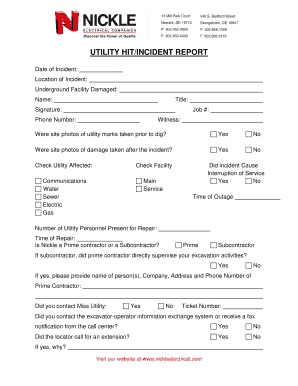
Get Utility Hit/incident Report - Nickle Electrical Companies
How it works
-

Open form follow the instructions
-

Easily sign the form with your finger
-

Send filled & signed form or save
How to fill out the UTILITY HIT/INCIDENT REPORT - Nickle Electrical Companies online
Completing the Utility Hit/Incident Report is essential for documenting incidents involving underground utilities. This guide will assist users in accurately filling out the report online to ensure relevant information is captured effectively.
Follow the steps to successfully complete the Utility Hit/Incident Report.
- Click ‘Get Form’ button to obtain the form and open it in the editor.
- Begin by entering the date and location of the incident at the top of the form. Ensure this information is accurate to facilitate proper record-keeping.
- Specify the underground facility that was damaged by selecting the appropriate options in the designated fields.
- Complete identification fields with your name, title, signature, job number, and phone number. Make sure all contact details are correct.
- Indicate if site photos of utility marks were taken before the dig and if photos of the damage were taken after the incident. Use the checkboxes provided.
- Select the type of utility affected by the incident, such as communications, water, sewer, electric, or gas, using the relevant checkboxes.
- Answer whether the incident caused an interruption of service and indicate the time of the outage if applicable.
- Fill in the number of utility personnel present for the repair, and record the time of repair.
- Clarify whether Nickle is a prime contractor or a subcontractor and provide additional details if you selected subcontractor.
- Indicate if you contacted Miss Utility and record the ticket number.
- Report if you contacted the excavator-operator information exchange system or received a fax notification from the call center.
- Verify if an extension was granted or if a marking delay was agreed to. Provide any additional relevant comments in the specified section.
- Describe the work area and excavation method. Use the provided choices to clarify your methods and the nature of the excavation.
- Document the nature and type of equipment used at the time of the incident. Be as detailed as possible.
- Finally, notify the utility operator of the damaged facility and record the date and time. Document who made and who received the report.
- Conclude by providing a general description of the circumstances surrounding the incident.
- After completing the form, save changes, download, print, or share the form as needed.
Complete your Utility Hit/Incident Report online today to ensure thorough documentation of your incident.