Loading
Get Wine Self-distribution Statement - Oregon.gov - Oregon
How it works
-

Open form follow the instructions
-

Easily sign the form with your finger
-

Send filled & signed form or save
How to use or fill out the WINE SELF-DISTRIBUTION STATEMENT - Oregon.gov - Oregon online
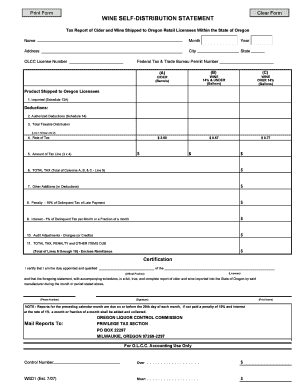
The WINE SELF-DISTRIBUTION STATEMENT is an essential document for wine self-distributors in Oregon, serving as a tax report for cider and wine shipped to retail licensees within the state. Completing this form accurately ensures compliance with state regulations and facilitates timely reporting.
Follow the steps to effectively fill out the WINE SELF-DISTRIBUTION STATEMENT online.
- Press the ‘Get Form’ button to access the WINE SELF-DISTRIBUTION STATEMENT and open it in your preferred editor.
- Enter your trade name exactly as it appears on your OLCC license in the Name field.
- Indicate the month for which you are reporting in the Month field.
- Specify the year corresponding to your reporting month in the Year field.
- Provide the physical address of your licensed premises in the Address field, ensuring not to include a mailing address.
- Fill in the City and State fields with the city and state of your physical address.
- Input your OLCC license number in the OLCC License Number field.
- Enter your Federal Tax & Trade Bureau Permit Number in the appropriate field.
- Complete the sections for product shipped to Oregon licensees, entering values for imported product in Line 1 from Schedule 13A.
- Document your authorized deductions in Line 2 from Schedule 14.
- Calculate your total taxable distribution by subtracting Line 2 from Line 1; record this in Line 3.
- Enter the current rate of tax applicable in Line 4.
- Compute the amount of tax owed by multiplying the amount in Line 3 by the rate in Line 4, and record this in Line 5.
- Sum the total of Columns A, B, and C for Line 6.
- Detail any other additions or deductions in Line 7.
- Indicate any penalties due for late reports or errors in Line 8.
- Note any interest owed on late reports in Line 9.
- Document any audit adjustments, either charges or credits, in Line 10.
- Calculate the total tax, penalties, and other items due by summing Lines 6 through 10 in Line 11.
- Complete the Certification section, including your official position, licensee name, contact phone number, signature, and your printed name.
- Once all sections are complete, you can save changes, download, print, or share the form as needed.
Complete your WINE SELF-DISTRIBUTION STATEMENT online today to ensure compliance and timely submission.
A charitable, fraternal or religious organization may offer alcoholic liquor as a prize, premium or consideration in a contest of chance described in ORS 167.117 (Definitions for ORS 167) (7)(b) or conducted as part of a Monte Carlo event as defined in ORS 167.117 (Definitions for ORS 167).