Loading
Get Warranty Service Form - Redington
How it works
-

Open form follow the instructions
-

Easily sign the form with your finger
-

Send filled & signed form or save
How to fill out the Warranty Service Form - Redington online
This guide provides comprehensive instructions on how to correctly fill out the Warranty Service Form for Redington products online. Following these steps will ensure that your warranty claim is processed efficiently.
Follow the steps to complete the form without errors.
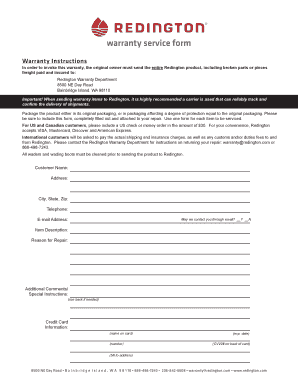
- Click 'Get Form' button to download the Warranty Service Form and open it in your preferred document editor.
- Fill in your personal details by providing your full name, address, city, state, and zip code. Ensure that this information is accurate to avoid any delays in processing your warranty claim.
- Input your contact information, including your telephone number and email address. Indicate whether you consent to be contacted via email by selecting 'Yes' or 'No'.
- Describe the item for which you are seeking repair by detailing the item description and stating the reason for repair clearly.
- Include any additional comments or special instructions that may assist the warranty team in processing your request. You may use the back of the form if more space is needed.
- Provide your credit card information if applicable, including the name on the card, card number, expiration date, and CVV2 number on the back of the card. Ensure the billing address is complete.
- Once all fields are filled out, review the form for clarity and completeness. Save your changes, then download, print, or share the completed form as required.
Complete the Warranty Service Form online to ensure your warranty claim is handled promptly.
Related links form
Redington Rod Warranty Redington offers are lifetime, original owner warranty on their fishing rods, with the notable exceptions of the Crosswater Series and the Minnow and Topo combos. They do not cover damage caused by misuse, neglect, theft, or loss.