Loading
Get Bcia 4084
How it works
-

Open form follow the instructions
-

Easily sign the form with your finger
-

Send filled & signed form or save
How to fill out the Bcia 4084 online
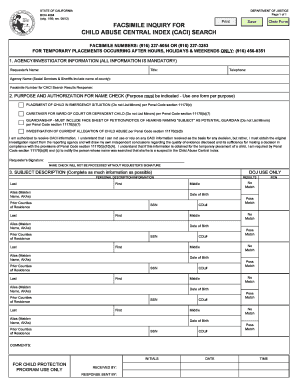
The Bcia 4084 form is a crucial document for requesting a search of the Child Abuse Central Index (CACI) in California. This guide provides step-by-step instructions to assist users in completing the form accurately and efficiently online.
Follow the steps to fill out the Bcia 4084 online effectively.
- Press the ‘Get Form’ button to access the Bcia 4084 form and open it in your browser or PDF editor for editing.
- Fill in the Agency/Investigator Information section. This includes mandatory fields such as your name, title, telephone number, agency name, and the facsimile number for receiving CACI search results.
- In the Purpose and Authorization for Name Check section, select the relevant reason for the name check by checking the appropriate box. Ensure that one form is submitted for each purpose.
- Acknowledge the understanding of CACI information usage by reading the statement carefully. You must provide your signature in the Requester’s Signature field to validate the submission.
- Complete the Subject Description section by providing as much personal information about the subject as possible, including last name, first name, date of birth, prior counties of residence, and social security numbers if available.
- Once all sections are filled out accurately, review the entire form to ensure all information is complete and correct.
- Finally, save your changes, download the completed form, and print or share it as needed for submission according to the requirements.
Complete your Bcia 4084 form online today for efficient processing.
Question: Which of the following statements about emotional abuse in NOT true? Answer: It does not need to be reported.