Loading
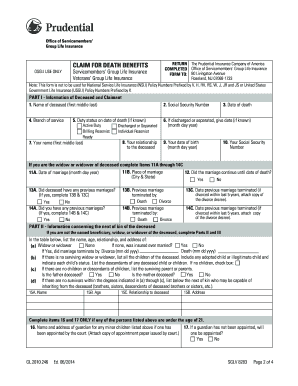
Get Claim For For Death Benefits Va Form 8283
How it works
-

Open form follow the instructions
-

Easily sign the form with your finger
-

Send filled & signed form or save
How to fill out the Claim For Death Benefits VA Form 8283 online
Completing the Claim For Death Benefits VA Form 8283 is an important step in securing the benefits you are entitled to after the loss of a loved one. This guide will help you navigate through each section of the form with clarity and support.
Follow the steps to successfully fill out the form.
- Click ‘Get Form’ button to obtain the form and open it in the editor.
- In Item 1, enter the full name of the deceased individual, including first, middle, and last names. Ensure accuracy to prevent delays.
- For Item 2, provide the Social Security Number of the deceased. If the individual does not have one, enter their service number.
- In Item 3, fill in the date of death of the deceased in the requested format.
- Complete Items 4, 5, and 6 by indicating the branch of service, duty status at the time of death (if known), and discharge or separation date (if known).
- In Items 7 through 10, provide your full name, relationship to the deceased, your date of birth, and your Social Security Number.
- If you were married to the deceased but not named as an insurance beneficiary, complete Items 11A through 14C as applicable, including the marriage details.
- Complete Part II if you are not the named beneficiary or spouse. List all relevant next of kin, including any children or surviving parents.
- In Part III, provide information related to the estate of the deceased, including the name and address of any executor or administrator.
- In Part IV, choose the preferred method of payment and include necessary banking details for Electronic Funds Transfer, if applicable.
- Finally, complete Part V by signing the form, providing your address, date, and phone number. Double-check all entries for accuracy before finalizing.
- Once completed, save your changes. You can then download or print the form for submission.
Complete your documents online to ensure a smooth claims process.
Get form
Experience a faster way to fill out and sign forms on the web. Access the most extensive library of templates available.
Go to milConnect. Sign in. Go to Benefits, Life Insurance SOES-SGLI Online Enrollment System. Check your coverage and beneficiary information and make any needed updates.
Get This Form Now!
Use professional pre-built templates to fill in and sign documents online faster. Get access to thousands of forms.