Loading
Get Use Fuel Refund Application - Azdot
How it works
-

Open form follow the instructions
-

Easily sign the form with your finger
-

Send filled & signed form or save
How to fill out the Use Fuel Refund Application - Azdot online
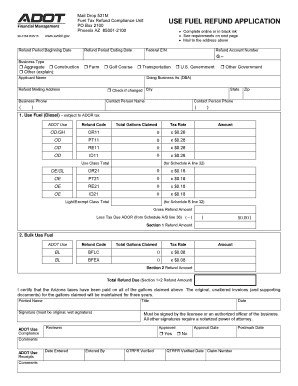
The Use Fuel Refund Application - Azdot is designed for individuals and entities licensed in Arizona to seek refunds on use fuel taxes. This guide will assist you in completing the application accurately and efficiently online.
Follow the steps to complete the application online easily.
- Click ‘Get Form’ button to obtain the form and open it in the editor.
- Begin by entering the refund period beginning date and ending date in the appropriate fields. Make sure the dates are correct to avoid any delays.
- Provide your Federal Employer Identification Number (EIN) and refund account number. This information is essential to verify your business status.
- Select your business type from the given options, indicating whether you are an aggregate, construction, farm, golf course, transportation, government, or others. If applicable, provide a brief explanation for 'Other'.
- Fill in the applicant's name, doing business as (DBA), and refund mailing address. Ensure the address is accurate to prevent issues with the delivery of funds.
- Enter the business phone number, contact person's name, and their phone number to ensure they can be reached for any inquiries.
- For the fuel types being claimed, input the total gallons claimed and the corresponding tax rate for each category (e.g., Use Fuel, Bulk Use Fuel). Ensure calculations for amounts are completed accurately.
- At the confirmation section, certify that the Arizona taxes have been paid on all gallons claimed and provide your printed name, title, and original signature. Ensure this signature is an original; printed or electronic signatures may not be accepted.
- Attachments may be required. Gather and attach original invoices and any supporting documents like the Bulk Fuel Inventory Reconciliation and Fuel Refund Equipment List as specified.
- Once all sections are filled out and reviewed for accuracy, you can save your changes, download the completed form, print it for mailing, or share it for further review if necessary.
Complete your Use Fuel Refund Application - Azdot online today to ensure you receive your eligible tax refunds!
Check your insurance and registration status online Using the ServiceArizona website, you can check whether the State of Arizona believes your vehicle is currently covered by insurance, and whether your registration is suspended.