Loading
Get St-340 New York State Department Of Taxation And Finance Annual Report Of Sales And Use Tax
How it works
-

Open form follow the instructions
-

Easily sign the form with your finger
-

Send filled & signed form or save
How to fill out the ST-340 New York State Department Of Taxation And Finance Annual Report Of Sales And Use Tax online
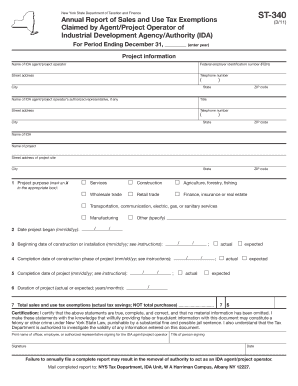
Filling out the ST-340 form is essential for agents and project operators of Industrial Development Agencies in New York. This guide offers a clear, structured approach to completing the Annual Report of Sales and Use Tax exemptions online, ensuring compliance with state regulations.
Follow the steps to complete the ST-340 form online
- Click ‘Get Form’ button to obtain the form and access it for editing.
- Enter the reporting year at the top of the form to specify the period covered by the report.
- Provide information about the IDA agent or project operator, including the name, federal employer identification number (FEIN), address, and telephone number.
- If applicable, fill out the name, title, address, and phone number of the authorized representative of the IDA agent or project operator.
- Input the name and address of the IDA involved in the project. If there are multiple IDAs, separate reports will be needed.
- Enter the project name and the specific address of the project site.
- Mark an X in the box next to the project purpose that applies to the project. If the purpose is not listed, select 'Other' and specify.
- Fill in the date the project began, using the format mm/dd/yy.
- Indicate the actual or expected date construction began or is expected to begin, along with marking the appropriate box.
- Specify the completion date for the construction phase of the project and mark if it is actual or expected.
- Enter the completion date for the entire project, again marking if it is actual or expected.
- Provide the total duration of the project in years and months.
- Input the total sales and use tax exemptions claimed during the reporting period. If there were none, enter 0.
- In the signature area, enter the name and title of the person signing on behalf of the IDA agent/project operator and provide the signature date.
- After reviewing the form for accuracy, you can save, download, or print the document, or share it as needed.
Complete your ST-340 form online today and ensure timely compliance!
Log in to (or create) your Business Online Services account. Select the ≡ Services menu in the upper-left corner of your Account Summary homepage. Select Sales tax - file and pay, then select Sales tax web file from the expanded menu.
Industry-leading security and compliance
US Legal Forms protects your data by complying with industry-specific security standards.
-
In businnes since 199725+ years providing professional legal documents.
-
Accredited businessGuarantees that a business meets BBB accreditation standards in the US and Canada.
-
Secured by BraintreeValidated Level 1 PCI DSS compliant payment gateway that accepts most major credit and debit card brands from across the globe.