Loading
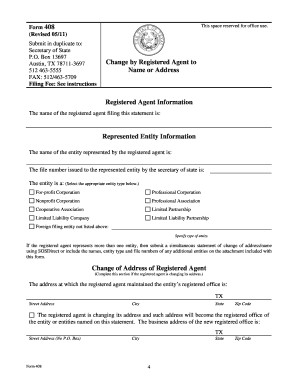
Get Form 408general Information - Sos Texas
How it works
-

Open form follow the instructions
-

Easily sign the form with your finger
-

Send filled & signed form or save
How to fill out the Form 408 General Information - Sos Texas online
Filling out the Form 408 General Information is essential for registered agents who need to update their name or address in Texas. This guide provides step-by-step instructions to help you complete the form accurately and efficiently online.
Follow the steps to fill out Form 408 General Information effectively.
- Click ‘Get Form’ button to obtain the form and access it in your chosen online environment.
- In the 'Registered Agent Information' section, enter the name of the registered agent as it is currently recorded with the secretary of state.
- For the 'Entity Information', provide the legal name of the entities represented by the agent. It is advisable to include the file number assigned by the secretary of state for faster processing.
- In the 'Address of Registered Agent' section, fill in both the current address and the new address where the registered agent will maintain the registered office. Ensure that the new address complies with the requirement of being a physical street address.
- If applicable, in the 'New Name of Registered Agent' section, enter the new name under which the registered agent will operate, ensuring it reflects continuity with the same individual or organization.
- Next, acknowledge the requirement to give written notice of the change to each entity represented at least 10 days before submission. Indicate this by checking the box provided.
- For effectiveness of filing, select one of the options (A, B, or C) to indicate when the change will take effect. Ensure to provide any necessary details for options B and C.
- In the 'Execution' section, sign the document, ensuring the name printed is that of the authorized individual responsible for the filing.
- If there are additional entities represented by the registered agent, list them in the provided area, ensuring each is grouped by type and follows the instruction for maximum fee conditions.
- After completing the form, save changes, and then opt to download, print, or share the finalized document as needed.
Begin filling out your Form 408 General Information online today to ensure your registered agent information is up to date.
The only way to change a registered office address is to file a statement of change. See Forms 401 (Word 103kb, PDF 94kb) and 408 (Word 170kb, PDF 117kb).