Loading
Get Taxpayer Name Rev - Mass
How it works
-

Open form follow the instructions
-

Easily sign the form with your finger
-

Send filled & signed form or save
How to fill out the Taxpayer Name Rev - Mass online
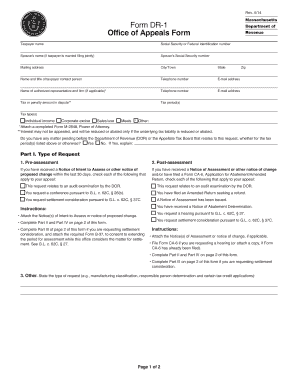
Filling out the Taxpayer Name Rev - Mass form online can be straightforward with the right guidance. This document is essential for individuals or entities seeking to address issues related to tax assessments with the Massachusetts Department of Revenue.
Follow the steps to successfully complete the form
- Use the 'Get Form' button to access the Taxpayer Name Rev - Mass form and launch it in your preferred digital editor.
- Begin by entering your social security number or federal identification number. If you are married and filing jointly, include your spouse's name and social security number.
- Provide your mailing address, including the city or town, state, and zip code to ensure correct correspondence from the Department of Revenue.
- Fill in the name and title of the taxpayer contact person, along with their telephone number and email address. If applicable, add the name and firm of an authorized representative.
- Indicate the tax or penalty amount in dispute, specifying the tax period and type of tax, such as individual income, corporate excise, sales/use, meals, or other.
- Answer whether there is any matter pending before the Department of Revenue or the Appellate Tax Board that relates to this request, and provide a brief explanation if applicable.
- Select the type of request. Choose from options like pre-assessment, post-assessment, or other, and ensure appropriate accompanying notices and documents are attached.
- In Part II, detail the issues in dispute, providing facts and legal issues that explain why you believe the tax amount is excessive or incorrect.
- For your settlement proposal in Part III, state and explain your proposed resolution. Include relevant supporting documentation.
- If choosing expedited settlement or limited information settlement, check the appropriate box and follow the criteria outlined in the form.
- Complete Part IV by signing the form under penalties of perjury, providing names and dates where required.
- Once completed, you can save any changes, download, print, or share the form as needed.
Begin filling out the Taxpayer Name Rev - Mass online today to ensure your tax matters are addressed promptly.
Payments Go to MassTaxConnect. Under "Quick Links" select “Make a Payment” Select “Individual Payment Type” and select "Next" Enter your SSN or ITIN and phone number (in case we need to contact you about this payment) Choose the type of tax payment you want to make and select "Next".