Loading
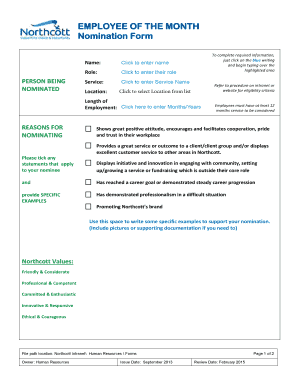
Get Employee Of The Month Nomination Form Interactive.pdf - Northcott
How it works
-

Open form follow the instructions
-

Easily sign the form with your finger
-

Send filled & signed form or save
How to fill out the Employee Of The Month Nomination Form Interactive.pdf - Northcott online
Filling out the Employee Of The Month Nomination Form is an essential process for recognizing outstanding contributions within the Northcott community. This guide aims to provide comprehensive instructions for effectively completing the nomination form online.
Follow the steps to complete your nomination form accurately.
- Press the ‘Get Form’ button to access the nomination form and open it in your preferred PDF editor.
- In the 'Person being nominated' section, click on the highlighted areas to enter the nominee's name, role, service name, and location. Ensure to select the location from the list provided.
- Next, provide the length of employment for the nominee by clicking on the designated field and entering the corresponding months or years.
- In the 'Reasons For Nominating' section, tick any applicable statements that reflect the nominee’s contributions. For additional context, use the space provided to include specific examples related to Northcott's values.
- If applicable, complete the details of the person filling out the form, including your name, email address (if you are not a Northcott employee), phone number, and the date. Identify your relationship to the nominee by selecting the appropriate checkbox.
- Ensure the supervisor endorsement section is filled out by entering the supervisor's name and position. Then, add a supporting statement to endorse the nomination.
- Upon completion, email the finalized form to employeeofthemonth@northcott.com.au to submit the nomination and obtain necessary endorsements.
Encourage others to recognize exceptional contributions by completing the nomination form online.
Nomination Writing Strategies Be specific in how the nominee met the award criteria. Provide concrete examples. Avoid too many pronouns and run-on sentences. Make the narrative clear and easy to read.
Industry-leading security and compliance
US Legal Forms protects your data by complying with industry-specific security standards.
-
In businnes since 199725+ years providing professional legal documents.
-
Accredited businessGuarantees that a business meets BBB accreditation standards in the US and Canada.
-
Secured by BraintreeValidated Level 1 PCI DSS compliant payment gateway that accepts most major credit and debit card brands from across the globe.