Loading
Get Adce Registered Contractor
How it works
-

Open form follow the instructions
-

Easily sign the form with your finger
-

Send filled & signed form or save
How to fill out the Adce Registered Contractor online
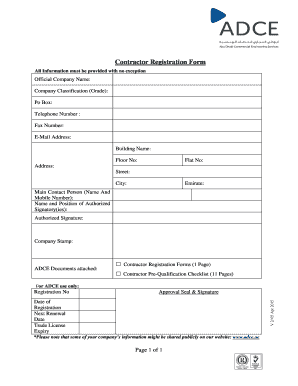
Filling out the Adce Registered Contractor form is an essential step for contractors seeking registration. This guide provides clear and supportive instructions to help users complete the form accurately and efficiently.
Follow the steps to complete the Adce Registered Contractor form online.
- Click ‘Get Form’ button to obtain the contractor registration form and open it for editing.
- Enter your official company name in the designated field. Ensure that the name matches the documentation provided for verification.
- Select your company classification grade from the available options. This classification is crucial for determining your registration status.
- Provide your post office box (PO Box) number. This information is necessary for correspondence purposes.
- Enter your telephone number clearly in the provided field. This will be used for official communication.
- Include fax number if applicable. Although not commonly used, it may still be relevant for certain communications.
- Fill in your email address accurately to ensure that you receive important updates and notifications.
- Indicate the name of the building where your company is located, along with the floor number.
- If applicable, provide your flat number. This helps to pinpoint the exact location of your business.
- Complete the address section, including the street name, city, and emirate. This information is vital for your registration.
- Enter the main contact person's name and mobile number. This individual will be the primary point of contact for your registration.
- List the name and position of the authorized signatory or signatories for your company. This information validates your registration.
- Provide the authorized signature where required along with the company stamp to finalize the form.
- Attach the required ADCE documents, including the contractor registration forms and the contractor pre-qualification checklist.
- In the reserved section for ADCE use only, leave space for the registration number, approval seal, signature, date of registration, next renewal date, and trade license expiry date.
- Finally, review all the entered information for accuracy and completeness. Users can then save changes, download, print, or share the form as needed.
Complete your contractor registration form online now to ensure timely processing.
Once you have made the payment, send a copy to regadce@adcb.com to receive instructions on the issuance of your registration certificate. The registration certificate and tax invoice will be issued within 2 to 3 working days after the payment is received.
Industry-leading security and compliance
US Legal Forms protects your data by complying with industry-specific security standards.
-
In businnes since 199725+ years providing professional legal documents.
-
Accredited businessGuarantees that a business meets BBB accreditation standards in the US and Canada.
-
Secured by BraintreeValidated Level 1 PCI DSS compliant payment gateway that accepts most major credit and debit card brands from across the globe.