Loading
Form preview
  • US Legal Forms
  • Form Library
  • More Forms
  • More Uncategorized Forms
  • Cathsseta Registration

Get Cathsseta Registration

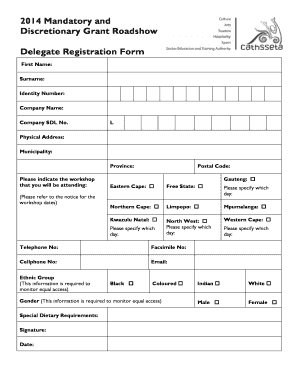
/02/2014 Kwazulu Natal Durban 7/02/2014 Western Cape Cape Town 11/02/2014 Western Cape Cape Town 12/02/2014 Eastern Cape Port Elizabeth 13/02/2014 Mpumalanga Nelspruit 13/02/2014 North West Mafikeng 17/02/2014 North West Rustenburg 18/02/2014 Free State Bloemfontein 19/02/2014 Northern Cape Kimberley 20/02/2014 Limpopo Polokwane 20/02/2014 Note: Workshops will commence at 10:00 and finish at 13:00. NB: Please complete the registration form and send it to sdf caths.

How it works

  1. Open form

    Open form follow the instructions

  2. Easily sign form

    Easily sign the form with your finger

  3. Share form

    Send filled & signed form or save

How to fill out the Cathsseta Registration online

Completing the Cathsseta Registration form online is a straightforward process that allows users to register for workshops effectively. This guide provides clear, step-by-step instructions to ensure you fill out the form accurately and efficiently.

Follow the steps to complete the registration form.

  1. Press the ‘Get Form’ button to access the registration form and open it in your editor.
  2. Begin by entering your first name and surname in the designated fields. Ensure that the spelling is accurate.
  3. Input your identity number in the specified field. This is essential for identification purposes.
  4. Provide the name of your company and its SDL number. This information is required for organizational identification.
  5. Fill in your physical address, including the municipality and province. Be precise to avoid any issues with registration.
  6. Select the workshop you plan to attend by marking the appropriate box next to the province options. Refer to the notice for specific dates.
  7. Complete the postal code field to ensure that all correspondence is sent to the correct location.
  8. Enter your contact information, including telephone number, facsimile number, and cellphone number. This will facilitate communication regarding the workshop.
  9. Provide your email address to receive confirmation and further information about the workshop.
  10. Indicate your ethnic group and gender only for the purpose of monitoring equal access; select the appropriate options.
  11. If you have any special dietary requirements, note them in the space provided to accommodate your needs during the workshop.
  12. Affix your signature and date the form to confirm the accuracy of the information provided.
  13. Once you have completed the form, save your changes, and then download or print it as needed. Finally, submit the form via email to sdf@cathsseta.org.za.

Take action now and complete your Cathsseta Registration online!

Get form

Experience a faster way to fill out and sign forms on the web. Access the most extensive library of templates available.
Get form

Related content

e-Books : 4540 - responseapp.warrencountyny.gov
Registration For Fet At Witbank · Adobe After Effects ... Cathsseta Bursaries Form ·...
Learn more
The case of Culture, Arts, Tourism, Hospitality...
providers, monitoring training provision, and the registration of assessors. CATHSSETA...
Learn more

Related links form

Employee Enrolment Form Hampton Inn Credit Card Authorization Form Gst Certificate My Earth Day Pledge My Earth Day Pledge My Earth Day Pledge My...

Questions & Answers

Get answers to your most pressing questions about US Legal Forms API.

Contact support

CATHSSETA accredits training providers and registers qualified assessors and moderators operating within the CATHSSETA scope. For more information on how to be accredited as a training provider or for a full list of our training providers, qualifications and skills programmes, please e-mail Griselda@cathsseta.org.za.

The Culture, Art, Tourism, Hospitality, and Sport Sector Education and Training Authority (CATHSSETA) is one of the 21 SETAs established under the Skills Development Act (No 97 of 1998) in 2001.

Overview. The mission of the Culture, Arts, Tourism, Hospitality and Sport Sector Education and Training Authority (CATHSSETA) is to facilitate skills development through strategic partnerships for CATHSSETA to contribute to economic growth.

To register, you need to visit the website https://secure.csd.gov.za/. We encourage you to still register on the CATHSSETA database for our records. Please download registration forms here.

Get This Form Now!

Use professional pre-built templates to fill in and sign documents online faster. Get access to thousands of forms.
Get form
If you believe that this page should be taken down, please follow our DMCA take down processhere.

Industry-leading security and compliance

US Legal Forms protects your data by complying with industry-specific security standards.
  • In businnes since 1997
    25+ years providing professional legal documents.
  • Accredited business
    Guarantees that a business meets BBB accreditation standards in the US and Canada.
  • Secured by Braintree
    Validated Level 1 PCI DSS compliant payment gateway that accepts most major credit and debit card brands from across the globe.
Get Cathsseta Registration
Get form
Form Packages
Adoption
Bankruptcy
Contractors
Divorce
Home Sales
Employment
Identity Theft
Incorporation
Landlord Tenant
Living Trust
Name Change
Personal Planning
Small Business
Wills & Estates
Packages A-Z
Form Categories
Affidavits
Bankruptcy
Bill of Sale
Corporate - LLC
Divorce
Employment
Identity Theft
Internet Technology
Landlord Tenant
Living Wills
Name Change
Power of Attorney
Real Estate
Small Estates
Wills
All Forms
Forms A-Z
Form Library
Customer Service
Your Privacy Choices
Terms of Service
Privacy Notice
Legal Hub
Content Takedown Policy
Bug Bounty Program
About Us
Help Portal
Legal Resources
Blog
Affiliates
Contact Us
Delete My Account
Site Map
Industries
Forms in Spanish
Localized Forms
State-specific Forms
Forms Kit
Legal Guides
Real Estate Handbook
All Guides
Prepared for You
Notarize
Incorporation services
Our Customers
For Consumers
For Small Business
For Attorneys
Our Sites
US Legal Forms
USLegal
FormsPass
pdfFiller
signNow
altaFlow
DocHub
Instapage
Social Media
Call us now toll free:
+1 833 426 79 33
As seen in:
  • USA Today logo picture
  • CBC News logo picture
  • LA Times logo picture
  • The Washington Post logo picture
  • AP logo picture
  • Forbes logo picture
© Copyright 1997-2026
airSlate Legal Forms, Inc.
3720 Flowood Dr, Flowood, Mississippi 39232
Form Packages
Adoption
Bankruptcy
Contractors
Divorce
Home Sales
Employment
Identity Theft
Incorporation
Landlord Tenant
Living Trust
Name Change
Personal Planning
Small Business
Wills & Estates
Packages A-Z
Form Categories
Affidavits
Bankruptcy
Bill of Sale
Corporate - LLC
Divorce
Employment
Identity Theft
Internet Technology
Landlord Tenant
Living Wills
Name Change
Power of Attorney
Real Estate
Small Estates
Wills
All Forms
Forms A-Z
Form Library
Customer Service
Your Privacy Choices
Terms of Service
Privacy Notice
Legal Hub
Content Takedown Policy
Bug Bounty Program
About Us
Help Portal
Legal Resources
Blog
Affiliates
Contact Us
Delete My Account
Site Map
Industries
Forms in Spanish
Localized Forms
State-specific Forms
Forms Kit
Legal Guides
Real Estate Handbook
All Guides
Prepared for You
Notarize
Incorporation services
Our Customers
For Consumers
For Small Business
For Attorneys
Our Sites
US Legal Forms
USLegal
FormsPass
pdfFiller
signNow
altaFlow
DocHub
Instapage
Social Media
Call us now toll free:
+1 833 426 79 33
As seen in:
  • USA Today logo picture
  • CBC News logo picture
  • LA Times logo picture
  • The Washington Post logo picture
  • AP logo picture
  • Forbes logo picture
© Copyright 1997-2026
airSlate Legal Forms, Inc.
3720 Flowood Dr, Flowood, Mississippi 39232