Loading
Get Client Intake Form - Maryland Capital Enterprises
How it works
-

Open form follow the instructions
-

Easily sign the form with your finger
-

Send filled & signed form or save
How to fill out the Client Intake Form - Maryland Capital Enterprises online
This guide provides users with clear, step-by-step instructions on how to fill out the Client Intake Form for Maryland Capital Enterprises online. By following these steps, you will ensure that all required information is accurately provided to facilitate your intake process.
Follow the steps to complete the form accurately.
- Press the ‘Get Form’ button to obtain the form and display it for completion.
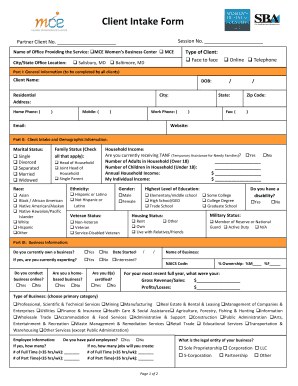
- Begin with Part I: General Information. Enter your name, date of birth, city, residential address, and contact numbers in the specified fields. Ensure your email address is entered correctly.
- Proceed to Part II: Client Intake and Demographic Information. Indicate your marital status and household income status. Fill in details regarding your family status, number of adults and children in the household, and your languages spoken.
- Under race and ethnicity, select your appropriate designation. Continue by providing information regarding your gender and highest level of education completed.
- In Part III: Business Information, indicate whether you currently own a business, whether it is home-based or if you conduct business online. Fill out the date started, business name, and ownership details.
- Provide your business’s gross revenue or sales along with profits or losses from the most recent full year. Additionally, select the primary category that describes your business type.
- In Part IV: Follow-up Information, share how you learned about Maryland Capital Enterprises. Specify the counseling assistance you are seeking.
- Read the agreement regarding the collection of follow-up information and sign the form where indicated. Select whether you wish to be added to the email list for future training seminars.
- Finally, review all sections for completeness. Once verified, save the changes, download the completed form, print, or share it as needed.
Start filling out your Client Intake Form online today!