Loading
Get Income Update Form - Anz
How it works
-

Open form follow the instructions
-

Easily sign the form with your finger
-

Send filled & signed form or save
How to fill out the Income Update Form - ANZ online
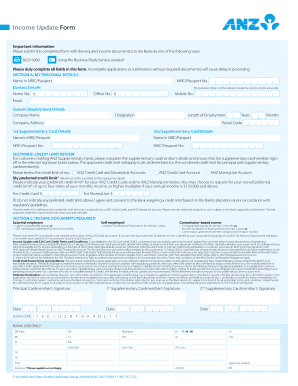
This guide provides a detailed overview of the Income Update Form - ANZ and offers step-by-step instructions for completing it online. Whether you are updating your personal information or reviewing your credit limit, this guide will assist you in submitting the form accurately.
Follow the steps to complete the Income Update Form effectively.
- Click 'Get Form' button to obtain the form and open it in the editor.
- Begin by filling out Section A: My Personal Details. This section requires your NRIC or passport number, name as listed on your NRIC or passport, and contact details, including home, office, and mobile numbers. Don't forget to provide your email address.
- In Section A, also include your current employment details. Provide your company name, designation, length of employment (in years and months), company address, and postal code.
- If applicable, fill in the supplementary card details for 1st and 2nd supplementary cardholders, including their names and NRIC or passport numbers.
- Proceed to Section B: Credit Limit Review. If you hold ANZ supplementary cards, ensure to complete the details for the supplementary cardmembers and collect their signatures in the designated areas.
- Indicate your preferred credit limit for your ANZ Credit Cards and/or ANZ MoneyLine. The minimum amount you can request is $500, and it must be rounded to the nearest hundred.
- In Section C, review the income documents required. Depending on your employment status (salaried, self-employed, or commission-based), provide the corresponding documents as stated.
- After completing all sections, read the customer declaration carefully. By signing, you acknowledge that your submitted information is complete and accurate. Ensure you have the principal cardmember and any applicable supplementary cardmembers sign and date the form.
- Finally, save changes, download, print, or share the form as needed. Make sure to submit the completed form along with the required documents to the bank using the advised submission method.
Start filling out your Income Update Form online today to ensure timely processing of your information.
In the ANZ App, the daily payment limit for Pay Anyone payments (BSB and account number or PaylD) is $1,000. For BPAY® payments it's $10,000.
Industry-leading security and compliance
US Legal Forms protects your data by complying with industry-specific security standards.
-
In businnes since 199725+ years providing professional legal documents.
-
Accredited businessGuarantees that a business meets BBB accreditation standards in the US and Canada.
-
Secured by BraintreeValidated Level 1 PCI DSS compliant payment gateway that accepts most major credit and debit card brands from across the globe.