Loading
Get Nc Osc
How it works
-

Open form follow the instructions
-

Easily sign the form with your finger
-

Send filled & signed form or save
How to fill out the Nc Osc online
Filling out the Nc Osc form online can be a straightforward process if you follow the appropriate steps. This guide provides detailed instructions to help users complete the form accurately and efficiently.
Follow the steps to complete the Nc Osc form online.
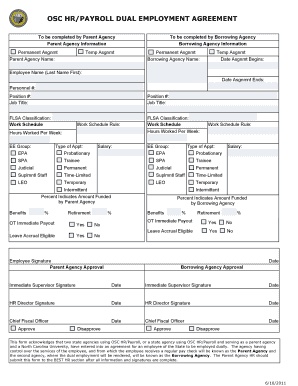
- To begin, click the ‘Get Form’ button to obtain the Nc Osc form and open it in a user-friendly online editor.
- Next, fill in the Parent Agency Information section, including the name of the Parent Agency and whether the assignment is permanent or temporary.
- Similarly, complete the Borrowing Agency Information section by entering the Borrowing Agency's name along with the type of assignment.
- Indicate the start date of the assignment and provide the employee's name, personnel number, position number, and job title.
- Complete the FLSA Classification and Work Schedule sections, providing the work schedule rules and hours worked per week as necessary.
- Select the appropriate type of appointment and enter the salary details, ensuring to denote percentages regarding funding by both Parent and Borrowing agencies.
- Complete the benefits sections regarding retirement, overtime payout eligibility, and leave accrual status. Use the yes/no options provided.
- Lastly, ensure all required signatures are completed, including those from the employee, parent agency, borrowing agency, immediate supervisor, HR director, and chief fiscal officer.
- Once all fields are filled out and reviewed, save your changes, then proceed to download, print, or share the completed form as needed.
Start filling out the Nc Osc form online today to ensure your dual employment agreement is processed efficiently.
Most State agencies use the North Carolina Accounting System (NCAS) for financial transaction processing. The entities that do not use NCAS are DOT, Employment Security Commission, the University System, and the Community Colleges.