Loading
Get Avra Homes
How it works
-

Open form follow the instructions
-

Easily sign the form with your finger
-

Send filled & signed form or save
How to fill out the Avra Homes online
Filling out the Avra Homes Rental Application & Registration Form online can be a straightforward process when approached step by step. This guide will provide you with comprehensive instructions to ensure you complete the form accurately and efficiently.
Follow the steps to complete your application online.
- Click ‘Get Form’ button to obtain the form and open it in your online editor.
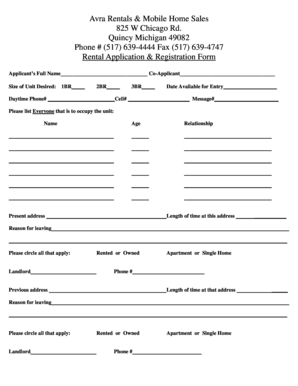
- Begin by filling in the applicant's full name and the name of the co-applicant, if applicable, in the provided fields.
- Indicate the size of the unit you desire by marking the appropriate box for 1BR, 2BR, or 3BR.
- Enter the date you would like to be available for entry in the designated space.
- Provide your daytime phone number, cell number, and a message number, ensuring all are accurate for communication.
- List everyone who will be occupying the unit by providing their names, ages, present addresses, relationships to you, time spent at current addresses, and the reasons for leaving if applicable.
- For your previous residences, circle whether you rented or owned and specify if it was an apartment or a single home. Provide the landlord’s phone number and address along with the length of time you lived there and the reason for leaving.
- Include personal references that are not related to you, providing their names, addresses, and phone numbers.
- List credit references, including the name of the institution, account types, numbers, and expiration dates as required.
- Provide details about the number of vehicles you own, including the year, make, and model of each vehicle.
- Fill in the applicant's and co-applicant's social security numbers, current employers, employment start dates, business addresses, phone numbers, positions or titles, contact persons, and weekly take-home pay.
- State whether you or your co-applicant have ever been arrested and provide explanations if the answer is yes.
- Complete the emergency contact information by entering the name, relationship, and phone numbers of your emergency contact person.
- Review the certification statement and ensure all information provided is true, complete, and correct. Obtain the signature of the applicant and co-applicant in the designated areas.
- Once you have filled out the form completely, you can save your changes, download a copy, print it out, or share it as needed.
Complete your application online today for a smoother process with Avra Rentals and Mobile Home Sales.