Loading
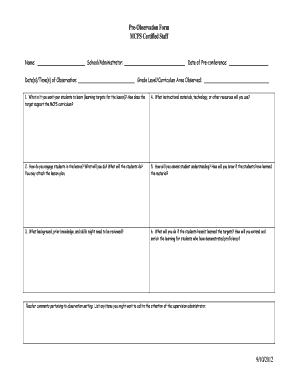
Get Pre-observation Form Mcps Certified Staff 9/10/2012
How it works
-

Open form follow the instructions
-

Easily sign the form with your finger
-

Send filled & signed form or save
How to use or fill out the Pre-Observation Form MCPS Certified Staff 9/10/2012 online
The Pre-Observation Form MCPS Certified Staff 9/10/2012 is a vital tool for educators to prepare for observation by administrators. This guide provides step-by-step instructions on how to fill out the form online, ensuring that all necessary information is accurately captured.
Follow the steps to complete your Pre-Observation Form online
- Press the ‘Get Form’ button to access the form and open it in your online editor.
- In the first section, enter your name, the name of the school or administrator, the date of the pre-conference, and the date(s)/time(s) of the observation. This information sets the context for your observations.
- Fill in the grade level and curriculum area being observed next. This helps clarify the focus of the observation.
- Detail your learning targets in question one. Describe what you want your students to learn and explain how it aligns with the MCPS curriculum.
- For question two, explain how you will engage the students in the lesson by detailing both your actions and those of the students. You may attach a lesson plan if necessary.
- In question three, describe any background knowledge, prior skills, and concepts you believe may need to be reviewed before the lesson begins.
- Question four asks you to list the instructional materials, technology, and other resources you plan to use during the lesson.
- Focus on how you will assess student understanding in question five. Describe your methods for determining if students have learned the material.
- In question six, outline your strategies for addressing any students who have not met the learning targets, as well as how you will extend and enrich the learning for those who have.
- Lastly, use the comments section to note anything specific you would like to highlight for the supervising administrator regarding the observation setting.
- Once all fields are complete and accurately filled out, you can save your changes, download the form, print it for hard copies, or share it as needed.
Complete your Pre-Observation Form online to enhance your teaching practices and prepare effectively for your observation.