Loading
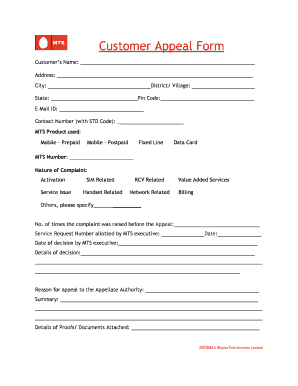
Get Customer Appeal Form - Mts India - Mtsindia
How it works
-

Open form follow the instructions
-

Easily sign the form with your finger
-

Send filled & signed form or save
How to fill out the Customer Appeal Form - MTS India - Mtsindia online
This guide provides clear and supportive instructions on how to complete the Customer Appeal Form for MTS India. By following these steps, you can ensure your appeal is submitted correctly and promptly.
Follow the steps to fill out the Customer Appeal Form accurately.
- Press the ‘Get Form’ button to access the Customer Appeal Form and open it in your preferred editor.
- Begin filling in your personal information. Start with the customer's name, address, city, district or village, state, and pin code. Ensure that all entries are clear and accurate.
- Provide your email ID and contact number, including the STD code, to facilitate communication regarding your appeal.
- Indicate the MTS product you are using by selecting one of the options: Mobile - Prepaid, Mobile - Postpaid, Fixed Line, or Data Card.
- Enter your MTS number in the designated field.
- Select the nature of your complaint from the provided options, such as Activation, Service Issue, SIM Related, Handset Related, Others (please specify), RCV Related, Network Related, Value Added Services, or Billing.
- State the number of times you have raised the complaint before the appeal and include the service request number that was allotted to you by the MTS executive.
- Fill in the date of your complaint and the date of the MTS executive's decision. Provide a summary of the decision made.
- Clearly articulate your reason for appealing to the Appellate Authority.
- List any attached proofs or documents that support your appeal.
- Declare whether you require an exemption from appearing in person by selecting 'Yes' or 'No.'
- Fill in your full name and the name of your parent or guardian if applicable. Sign the form to certify that the information provided is accurate to the best of your knowledge.
- Specify your status (individual, company, firm, society, or other) in the appropriate section.
- Ensure that you submit the appeal in duplicate as required. Remember, the appeal must be filed within 30 days of the MTS executive's decision.
- Review all entries for accuracy, then save changes to the form. You may choose to download, print, or share the completed form as needed.
Complete and submit your Customer Appeal Form online to ensure your concerns are addressed promptly.
Industry-leading security and compliance
US Legal Forms protects your data by complying with industry-specific security standards.
-
In businnes since 199725+ years providing professional legal documents.
-
Accredited businessGuarantees that a business meets BBB accreditation standards in the US and Canada.
-
Secured by BraintreeValidated Level 1 PCI DSS compliant payment gateway that accepts most major credit and debit card brands from across the globe.