We use cookies to improve security, personalize the user experience, enhance our marketing activities (including cooperating with our marketing partners) and for other business use.
Click "here" to read our Cookie Policy. By clicking "Accept" you agree to the use of cookies. Read less
Read more
Accept
Loading
Form preview
  • US Legal Forms
  • Form Library
  • More Forms
  • More Uncategorized Forms
  • Student Transfer Form (tfv3) - University Of Portsmouth - Port Ac

Get Student Transfer Form (tfv3) - University Of Portsmouth - Port Ac

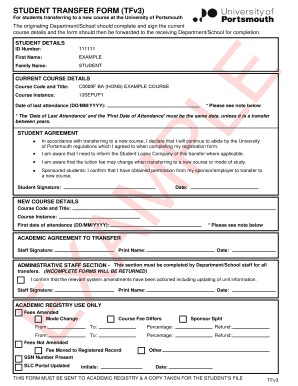
STUDENT TRANSFER FORM (TFv3) For students transferring to a new course at the University of Portsmouth The originating Department/School should complete and sign the current course details and the.

How it works

  1. Open form

    Open form follow the instructions

  2. Easily sign form

    Easily sign the form with your finger

  3. Share form

    Send filled & signed form or save

How to fill out the STUDENT TRANSFER FORM (TFv3) - University Of Portsmouth - Port Ac online

Filling out the Student Transfer Form (TFv3) for the University of Portsmouth is a critical step for students wishing to transfer to a new course. This guide provides clear, step-by-step instructions to ensure that you complete the form accurately and efficiently.

Follow the steps to successfully complete your transfer form.

  1. Click ‘Get Form’ button to obtain the form and open it in your preferred editor.
  2. Fill in your student details. Include your first name, family name, and student ID number as indicated on the form.
  3. Provide your current course details, including the course code and title as well as the course instance. Enter the date of your last attendance using the format DD/MM/YYYY. Remember that this date should match the first date of attendance unless you are transferring between academic years.
  4. Complete the student agreement section. Here, you will declare your commitment to follow the university regulations, inform the Student Loans Company (if applicable), and acknowledge potential changes to tuition fees. If you are a sponsored student, confirm that you have obtained permission from your sponsor or employer.
  5. Sign and date the form to confirm your agreement.
  6. Enter the details for your new course in the designated section, including the new course code, title, course instance, and first date of attendance.
  7. Ensure that the academic agreement to transfer section is signed by the relevant staff member, including their printed name and date.
  8. The administrative staff section must be completed by the department or school staff. This includes confirming that all system amendments have been made.
  9. Finally, submit the completed form to the Academic Registry and ensure you keep a copy for your records. You may also save changes, download, print, or share the form as needed.

Complete and submit your Student Transfer Form online today to ensure a smooth transition to your new course.

Get form

Experience a faster way to fill out and sign forms on the web. Access the most extensive library of templates available.
Get form

Related content

Evening public ledger. [volume] (Philadelphia...
About Evening public ledger. [volume] (Philadelphia [Pa.]) 1914-1942. Image provided by:...
Learn more
11958297 files 8600432 settings 8347444 us 5796345...
... ed 191936 manifests 185571 ac 185204 download 185012 store 183711 menu ... other 37081...
Learn more

Related links form

IN Commercial Sewer Discharge Form - Goshen City 2019 UMA Loan Discharge Affirmation 2017 IRS 4797 2020 IRS 8888 2020

Questions & Answers

Get answers to your most pressing questions about US Legal Forms API.

Contact support

If you wish to attend a university or other academic institution in the United States, including primary and secondary school, or a language training program you will require an F-1 visa.

If you want to join us from another university after you've completed an academic year, you need to apply online through UCAS. When you apply, you need to specify your 'point of entry', which translates to the year you want to begin: Point of entry 1 – Year 1 (Level 4) Point of entry 2 – Year 2 (Level 5)

These rigorous accreditation practices make the UK one of the most trusted and accepted degrees around the globe. Because of this, the US recognizes UK degrees for both further education and employment in the US. As always, there are some exceptions to the rule.

As a result, UK-educated transfer students can find themselves grappling with an unbalanced academic schedule if they do go to the USA. They must invest time and effort in fulfilling distribution requirements in areas like foreign languages, arts, and humanities, which they have not previously encountered.

The exact requirements and transfer process for international students vary by school and sometimes by academic program. Some schools allow students to transfer anytime whether it's after three years of study or only one semester. Others only allow transfer students who have completed 1-2 years of study.

Transfer to a US university Students typically need to complete at least one year of undergraduate-level study before applying for transfer admission. The amount of coursework you can transfer to your US degree program will depend on your grades, and whether your chosen US university offers equivalent courses.

Yes, you can. However, this may depend on the policy of the university you are attending and the one you want to switch to. Some university programs require you to transfer to select universities after completing your first year as a part of your program.

This information is for current University of Portsmouth students. If you have not started your course and wish to make a change you should contact our Admissions Teams: UK applicants - admissions@port.ac.uk. International applicants - globaladmissions@port.ac.uk.

Get This Form Now!

Use professional pre-built templates to fill in and sign documents online faster. Get access to thousands of forms.
Get form
If you believe that this page should be taken down, please follow our DMCA take down processhere.

Industry-leading security and compliance

US Legal Forms protects your data by complying with industry-specific security standards.
  • In businnes since 1997
    25+ years providing professional legal documents.
  • Accredited business
    Guarantees that a business meets BBB accreditation standards in the US and Canada.
  • Secured by Braintree
    Validated Level 1 PCI DSS compliant payment gateway that accepts most major credit and debit card brands from across the globe.
Get STUDENT TRANSFER FORM (TFv3) - University Of Portsmouth - Port Ac
Get form
Form Packages
Adoption
Bankruptcy
Contractors
Divorce
Home Sales
Employment
Identity Theft
Incorporation
Landlord Tenant
Living Trust
Name Change
Personal Planning
Small Business
Wills & Estates
Packages A-Z
Form Categories
Affidavits
Bankruptcy
Bill of Sale
Corporate - LLC
Divorce
Employment
Identity Theft
Internet Technology
Landlord Tenant
Living Wills
Name Change
Power of Attorney
Real Estate
Small Estates
Wills
All Forms
Forms A-Z
Form Library
Customer Service
Terms of Service
Privacy Notice
Legal Hub
Content Takedown Policy
Bug Bounty Program
About Us
Help Portal
Legal Resources
Blog
Affiliates
Contact Us
Delete My Account
Site Map
Industries
Forms in Spanish
Localized Forms
State-specific Forms
Forms Kit
Legal Guides
Real Estate Handbook
All Guides
Prepared for You
Notarize
Incorporation services
Our Customers
For Consumers
For Small Business
For Attorneys
Our Sites
US Legal Forms
USLegal
FormsPass
pdfFiller
signNow
airSlate WorkFlow
DocHub
Instapage
Social Media
Call us now toll free:
+1 833 426 79 33
As seen in:
  • USA Today logo picture
  • CBC News logo picture
  • LA Times logo picture
  • The Washington Post logo picture
  • AP logo picture
  • Forbes logo picture
© Copyright 1997-2025
airSlate Legal Forms, Inc.
3720 Flowood Dr, Flowood, Mississippi 39232
Form Packages
Adoption
Bankruptcy
Contractors
Divorce
Home Sales
Employment
Identity Theft
Incorporation
Landlord Tenant
Living Trust
Name Change
Personal Planning
Small Business
Wills & Estates
Packages A-Z
Form Categories
Affidavits
Bankruptcy
Bill of Sale
Corporate - LLC
Divorce
Employment
Identity Theft
Internet Technology
Landlord Tenant
Living Wills
Name Change
Power of Attorney
Real Estate
Small Estates
Wills
All Forms
Forms A-Z
Form Library
Customer Service
Terms of Service
Privacy Notice
Legal Hub
Content Takedown Policy
Bug Bounty Program
About Us
Help Portal
Legal Resources
Blog
Affiliates
Contact Us
Delete My Account
Site Map
Industries
Forms in Spanish
Localized Forms
State-specific Forms
Forms Kit
Legal Guides
Real Estate Handbook
All Guides
Prepared for You
Notarize
Incorporation services
Our Customers
For Consumers
For Small Business
For Attorneys
Our Sites
US Legal Forms
USLegal
FormsPass
pdfFiller
signNow
airSlate WorkFlow
DocHub
Instapage
Social Media
Call us now toll free:
+1 833 426 79 33
As seen in:
  • USA Today logo picture
  • CBC News logo picture
  • LA Times logo picture
  • The Washington Post logo picture
  • AP logo picture
  • Forbes logo picture
© Copyright 1997-2025
airSlate Legal Forms, Inc.
3720 Flowood Dr, Flowood, Mississippi 39232