Loading
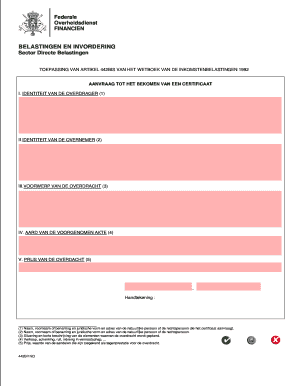
Get 442bis
How it works
-

Open form follow the instructions
-

Easily sign the form with your finger
-

Send filled & signed form or save
How to fill out the 442bis online
Filling out the 442bis form online can seem daunting, but with the right guidance, it is manageable. This guide provides clear and supportive instructions to help you complete the form accurately and efficiently.
Follow the steps to successfully complete the 442bis form online.
- Click the ‘Get Form’ button to obtain the form and open it in the editor.
- In section I, fill out the identity of the transferor. Include the full name or company name, the legal form, and the address of the individual or entity requesting the certificate.
- In section II, provide the identity of the transferee. Similar to section I, include their name, the legal form, and the address of the person or organization involved.
- Section III requires details about the object of the transfer. Describe the items or elements that are being transferred, ensuring to provide a clear situational context.
- In section IV, indicate the nature of the intended act. Specify whether it is a sale, donation, exchange, or contribution to a company.
- For section V, enter the price of the transfer. This should reflect the value or consideration, such as the price of shares awarded as compensation for the transfer.
- Finally, ensure to provide your signature at the end of the form. Verify that all the information is accurate and complete before proceeding.
- Once you have completed the form, you can save your changes, download a copy, print it, or share it as needed.
Start filling out your 442bis form online today for a smooth and efficient process.