Loading
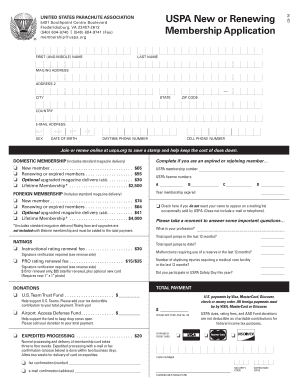
Get Uspa New Or Renewing Membership Application Form
How it works
-

Open form follow the instructions
-

Easily sign the form with your finger
-

Send filled & signed form or save
How to fill out the Uspa New or Renewing Membership Application Form online
Filling out the Uspa New or Renewing Membership Application Form online can streamline your membership process and ensure accuracy. This guide provides step-by-step instructions for completing each section of the form, making it user-friendly for everyone.
Follow the steps to complete your membership application online.
- Click the ‘Get Form’ button to access the Uspa New or Renewing Membership Application Form and open it in your preferred editor.
- Enter your personal information, starting with your first and middle name, followed by your last name. This is crucial for accurate identification.
- Complete your mailing address, ensuring to fill in all parts, including address line 2, city, state, ZIP code, and country.
- Provide your email address and select your sex from the options provided (choose M, F, or leave blank).
- Fill in your date of birth by entering the month (MO), day (DY), and year (YR). This is necessary for membership validation.
- Input your daytime and cell phone numbers. This facilitates communication regarding your membership.
- Indicate whether you are a new or renewing member by selecting the appropriate box. If renewing, include your previous USPA membership number.
- Choose your membership type, either domestic or foreign, and specify if you want an upgraded magazine delivery option.
- If applicable, select any ratings and include any fees associated, ensuring to read about signature verification requirements.
- Complete the donation section by entering amounts for the U.S. Team Trust Fund, the Airport Access Defense Fund, and other contributions if you wish to support these initiatives.
- For expedited processing, indicate your preference for confirmation by fax or email, filling in necessary details.
- Fill out your payment details, including credit card information, ensuring accuracy in card number, security code, and expiration date.
- Review all entered information for accuracy and completeness before submitting your application. Finally, save changes, download, print, or share the form as needed.
Start completing your Uspa New or Renewing Membership Application Form online today for a hassle-free experience.
USPA and USAPL both require you to be a member in order to compete. Their forms can be found here for USPA and here for USAPL.
Industry-leading security and compliance
US Legal Forms protects your data by complying with industry-specific security standards.
-
In businnes since 199725+ years providing professional legal documents.
-
Accredited businessGuarantees that a business meets BBB accreditation standards in the US and Canada.
-
Secured by BraintreeValidated Level 1 PCI DSS compliant payment gateway that accepts most major credit and debit card brands from across the globe.