Loading
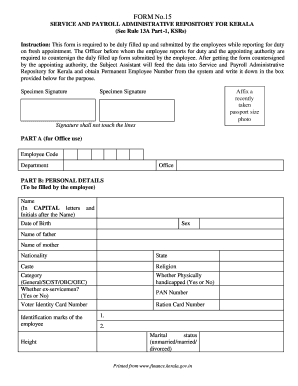
Get Form No.15 Service And Payroll Administrative... - Civilsupplies Org%2fdownloads%2fform%2520no
How it works
-

Open form follow the instructions
-

Easily sign the form with your finger
-

Send filled & signed form or save
How to fill out the FORM No.15 SERVICE AND PAYROLL ADMINISTRATIVE... online
The FORM No.15 SERVICE AND PAYROLL ADMINISTRATIVE... serves as a crucial document for employees reporting for duty on fresh appointments in Kerala. This guide will provide you with a structured approach to accurately complete the form online, ensuring compliance and efficiency in your submission process.
Follow the steps to accurately fill out the FORM No.15.
- Press the ‘Get Form’ button to access the form and open it in your preferred editor.
- Begin by filling in the personal details section (Part B). Input your name in capital letters, date of birth, and sex. Be sure to include the names of your parents, nationality, state, caste category, and indicate if you are an ex-serviceman and whether you hold a voter identity card number.
- Continue with the contact details (Part C). Provide your present and permanent addresses, including house number, street name, place, pin code, state, district, taluk, and village. Also, include your phone number, mobile number, home town, and email address.
- In Part D, provide recruitment details such as the source of recruitment, method of appointment, advice memo number, and whether it is a district recruitment. Fill in the appointment order number, type of recruitment, scale of pay, advice memo date, district details (if applicable), entry category, and appointment order date.
- If you have prior government employment, include those details in Part E. List your previous department, designation, relieving order number and date, earlier recruiting agency, and previous appointment order information.
- In Part F, declare your educational qualifications by specifying course titles, subjects, university or board, institution studied, class or percentage achieved, registration number, and the year.
- Complete the declaration in Part G, confirming the accuracy of the information provided. Sign and date the form in the designated areas.
- Finally, after filling out all sections, save the changes, and you may choose to download, print, or share the form as needed.
Complete your documents online to ensure a smooth reporting process!
Industry-leading security and compliance
US Legal Forms protects your data by complying with industry-specific security standards.
-
In businnes since 199725+ years providing professional legal documents.
-
Accredited businessGuarantees that a business meets BBB accreditation standards in the US and Canada.
-
Secured by BraintreeValidated Level 1 PCI DSS compliant payment gateway that accepts most major credit and debit card brands from across the globe.