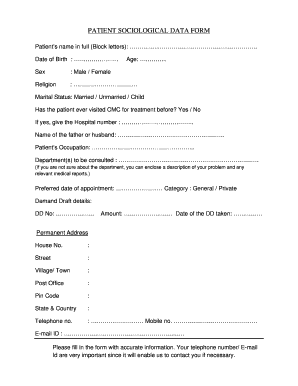
PATIENT SOCIOLOGICAL DATA FORM Patient s name in full Block letters. Date of Birth. Age. Sex Male / Female Religion Marital Status Married / Unmarried / Child Has the patient ever visited CMC for treatment before Yes / No If yes give the Hospital number. Name of the father or husband. Patient s Occupation. Department s to be consulted If you are not sure about the department you can enclose a description of your problem and any relevant medical reports. Preferred date of appointment Category General / Private Demand Draft details DD No. Amount. Date of the DD taken Permanent Address House No* Street Village/ Town Post Office Pin Code State Country Telephone no. Mobile no. E-mail ID. Please fill in the form with accurate information* Your telephone number/ E-mail Id are very important since it will enable us to contact you if necessary. Name of the father or husband. Patient s Occupation. Department s to be consulted If you are not sure about the department you can enclose a description....
Open form follow the instructions
Easily sign the form with your finger
Send filled & signed form or save
How to fill out the Patient Sociological Data Form online
Filling out the Patient Sociological Data Form online is an important step in providing essential information to healthcare providers. This guide will walk you through each section of the form to ensure you complete it accurately and efficiently.
Follow the steps to successfully complete the form online.
- Click the ‘Get Form’ button to access the Patient Sociological Data Form and open it in your chosen document editor.
- Begin by entering the patient’s full name in block letters in the designated field. Ensure the spelling is accurate and complete.
- Next, fill in the patient's date of birth using the format specified. This helps in identifying the age accurately.
- Enter the patient's age in the corresponding section. This is a critical piece of information for medical records.
- Indicate the patient's sex by selecting either 'Male' or 'Female' as appropriate.
- Complete the religion field by writing the individual's religious affiliation if applicable.
- Select the marital status by choosing from 'Married,' 'Unmarried,' or 'Child’.
- Respond to the question about previous visits to CMC for treatment by selecting 'Yes' or 'No.' If you answer 'Yes,' provide the hospital number if you have it.
- Enter the name of the father or partner in the designated field.
- Input the patient's occupation, providing as much detail as necessary.
- Specify the department(s) you wish to consult. If unsure, describe your problem and attach any relevant medical reports.
- Select your preferred date for the appointment and choose a category between 'General' or 'Private.'
- Provide the Demand Draft details, including the DD number, amount, and the date it was taken.
- Fill in the permanent address completely, covering house number, street, village/town, post office, pin code, state, and country.
- Enter your telephone number and mobile number. Include your email ID as well; these contact details are crucial for communication.
- Finally, review the form for accuracy and completeness before you save your changes, download, print, or share the completed form as needed.
Start filling out your Patient Sociological Data Form online today for streamlined healthcare access.
Experience a faster way to fill out and sign forms on the web. Access the most extensive library of templates available.
Related content
Oct 8, 2020 — Midcourse Review Data Are In! Check out our interactive infographic to see...
social/behavioral data collected from JHMI patients and stored in various data sources...
In economics, the Gini coefficient sometimes called the Gini index or Gini ratio, is a...
Get answers to your most pressing questions about US Legal Forms API.
What are the data types of EHR?
Data types commonly extracted from EHRs and imported into registries are patient identifiers, demographics, diagnoses, medications, procedures, laboratory results, vital signs, and utilization events.
What is an EHR template?
What are electronic health record templates? A well-designed template is short, easy to use, includes pertinent positives and negatives, incorporates guidelines, and offers mnemonics to help deliver evidence-based care under the time constraints of a busy office.
What are the 3 components of the EHR system?
Key components of an EHR Patient Management. The patient management component facilitates the capture, storage and retrieval of up-to-date information related to new patients. ... Clinical Component. ... Secure Messaging and Alerts. ... Financial Dashboards. ... Revenue Cycle Management (RCM)
How do you get patient data?
You can collect patient data in several different ways — by conducting an interview in a clinical setting, by having the patient complete a paper form, or by having the patient fill out an online form.
What is the EHR format?
EHRs may include a range of data, including demographics, medical history, medication and allergies, immunization status, laboratory test results, radiology images, vital signs, personal statistics like age and weight, and billing information.
What are the examples of patient data?
Medical data found in an electronic health record can include: General numerical information, such as vital signs like heart rate, respiratory rate, and temperature. Diagnostic-related information, like laboratory test results from blood tests, genetic tests, culture results, and so on.
What is EMR format?
Electronic medical records (EMRs) are a digital version of the paper charts in the clinician's office. An EMR contains the medical and treatment history of the patients in one practice. EMRs have advantages over paper records. For example, EMRs allow clinicians to: Track data over time.
What is the patient demographic data?
Patient demographic data refers to all of the non-clinical data about a patient, including: name, date of birth, address, phone number, email address, sex, race, etc.
Use professional pre-built templates to fill in and sign documents online faster. Get access to thousands of forms.
If you believe that this page should be taken down, please follow our DMCA take down process here.