We use cookies to improve security, personalize the user experience, enhance our marketing activities (including cooperating with our marketing partners) and for other business use.
Click "here" to read our Cookie Policy. By clicking "Accept" you agree to the use of cookies. Read less
Read more
Accept
Loading
Form preview
  • US Legal Forms
  • Form Library
  • More Forms
  • More Uncategorized Forms
  • Csc Spv Stand For Form

Get Csc Spv Stand For Form

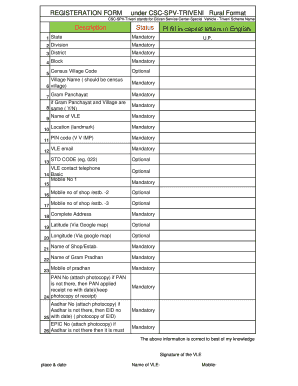
Istrict Mandatory 4 Block Pl fill in capital letters in English Mandatory 5 Census Village Code Village Name ( should be census 6 village) 7 Gram Panchayat if Gram Panchayat and Village are 8 same ( Y/N) 9 10 11 12 13 20 21 22 23 Mandatory Mandatory Mandatory PIN code (V V IMP) Mandatory VLE email Mandatory STD CODE (eg. 022) Optional Mobile No 1 19 Mandatory Location (landmark) 15 18 Optional Mandatory VLE contact telephone 17 Mandatory Name of VLE 14 Basic 16 U.

How it works

  1. Open form

    Open form follow the instructions

  2. Easily sign form

    Easily sign the form with your finger

  3. Share form

    Send filled & signed form or save

How to fill out the Csc Spv Stand For Form online

Filling out the Csc Spv Stand For Form online is a straightforward process that helps ensure the accurate collection of essential information for the Citizen Service Center-Special Vehicle program. This guide provides clear, step-by-step instructions to assist users in completing the form efficiently and correctly.

Follow the steps to complete your form online.

  1. Click ‘Get Form’ button to obtain the form and open it in the editor.
  2. Begin by filling in your state and division in the designated fields. Make sure to provide accurate and current information, as these details are mandatory.
  3. Next, enter your district and block information. Remember to fill these fields in capital letters in English.
  4. Provide the Census Village Code and the Village Name in accordance with census data, ensuring to double-check for correctness.
  5. Fill in the Gram Panchayat details if applicable, indicating whether the Gram Panchayat and Village are the same by answering 'Yes' or 'No'.
  6. Enter the mandatory PIN code accurately as this is crucial for identification.
  7. Provide your VLE email address, ensuring it is entered correctly as it is a required field.
  8. Optionally, enter the STD code, along with the mandatory Mobile Number 1.
  9. List the location or landmark referencing your establishment if applicable, and fill in the contact information for the VLE telephone.
  10. Proceed to enter the name of the VLE, along with other required details, including the complete address and additional mobile numbers if necessary.
  11. For additional information, you can provide the latitude and longitude using Google Maps, but these fields are optional.
  12. Enter the names of the Gram Pradhan along with their mobile number.
  13. Collect and attach photocopies of PAN card, Aadhar card, and EPIC if available. If not available, provide the relevant receipts.
  14. After filling out the required fields, review your entries to ensure accuracy.
  15. Once satisfied, you can save changes, download, print, or share the completed form as needed.

Complete your forms online today and ensure your application is processed efficiently!

Get form

Experience a faster way to fill out and sign forms on the web. Access the most extensive library of templates available.
Get form

Related content

S-1 - SEC.gov
If any of the securities being registered on this Form are to be offered on a delayed or...
Learn more
DLA Acronym List - Defense Logistics Agency
Jun 14, 2007 — Corporate Source Authority System. CSC. Communications Systems...
Learn more
Acronym Dicitonary And Glossary ACS Universal...
... Identifier BNF Backus-Naur Form B-NT Broadband Network Termination BNT ... Modes CMOS...
Learn more

Related links form

Phylum Echinoderms Webquest - Mr. Kuske's Classroom Mar Ivanios College Syllabus Call For FY 2019 DoD Frontier Project Proposals - HPCMP Gladstone Land Corporation - Subscription Agreement - Final - 6/4/18

Questions & Answers

Get answers to your most pressing questions about US Legal Forms API.

Contact support

Special Purpose Vehicle (SPV) & Entity Formation.

There are four major types of SPVs: Project companies, investment vehicles, intermediate SPVs, and jurisdictional shell companies. Project companies are used primarily to finance capital-intensive public-private projects, such as infrastructure construction.

A special purpose vehicle is an orphan company created to isolate risks and reallocate assets to investors. Property investments are typically held in special property vehicles. Companies can transfer property ownership to an SPV and sell off that entity, paying (lower) capital gains tax instead of property sales tax.

There are four major types of SPVs: Project companies, investment vehicles, intermediate SPVs, and jurisdictional shell companies. Project companies are used primarily to finance capital-intensive public-private projects, such as infrastructure construction.

A special purpose vehicle (SPV) is a subsidiary company that is formed to undertake a specific business purpose or activity. SPVs are commonly utilized in certain structured finance applications, such as asset securitization, joint ventures, property deals, or to isolate parent company assets, operations, or risks.

The purpose of a joint venture is to pursue a specific business opportunity or to undertake a specific project that will be beneficial to all parties involved. A special purpose vehicle (SPV) is a legal entity that is created for a specific purpose, such as financing a particular project.

Special purpose vehicles (SPVs) are commonly used by startups to raise capital from investors. An SPV is created to act as an intermediary between a group of investors who want to pool their money and the startups they are investing in.

What Is a Special Purpose Vehicle (SPV)? A special purpose vehicle, also called a special purpose entity (SPE), is a subsidiary created by a parent company to isolate financial risk. Its legal status as a separate company makes its obligations secure even if the parent company goes bankrupt.

Get This Form Now!

Use professional pre-built templates to fill in and sign documents online faster. Get access to thousands of forms.
Get form
If you believe that this page should be taken down, please follow our DMCA take down processhere.

Industry-leading security and compliance

US Legal Forms protects your data by complying with industry-specific security standards.
  • In businnes since 1997
    25+ years providing professional legal documents.
  • Accredited business
    Guarantees that a business meets BBB accreditation standards in the US and Canada.
  • Secured by Braintree
    Validated Level 1 PCI DSS compliant payment gateway that accepts most major credit and debit card brands from across the globe.
Get Csc Spv Stand For Form
Get form
Form Packages
Adoption
Bankruptcy
Contractors
Divorce
Home Sales
Employment
Identity Theft
Incorporation
Landlord Tenant
Living Trust
Name Change
Personal Planning
Small Business
Wills & Estates
Packages A-Z
Form Categories
Affidavits
Bankruptcy
Bill of Sale
Corporate - LLC
Divorce
Employment
Identity Theft
Internet Technology
Landlord Tenant
Living Wills
Name Change
Power of Attorney
Real Estate
Small Estates
Wills
All Forms
Forms A-Z
Form Library
Customer Service
Terms of Service
Privacy Notice
Legal Hub
Content Takedown Policy
Bug Bounty Program
About Us
Blog
Affiliates
Contact Us
Delete My Account
Site Map
Industries
Forms in Spanish
Localized Forms
State-specific Forms
Forms Kit
Legal Guides
Real Estate Handbook
All Guides
Prepared for You
Notarize
Incorporation services
Our Customers
For Consumers
For Small Business
For Attorneys
Our Sites
US Legal Forms
USLegal
FormsPass
pdfFiller
signNow
airSlate WorkFlow
DocHub
Instapage
Social Media
Call us now toll free:
+1 833 426 79 33
As seen in:
  • USA Today logo picture
  • CBC News logo picture
  • LA Times logo picture
  • The Washington Post logo picture
  • AP logo picture
  • Forbes logo picture
© Copyright 1997-2025
airSlate Legal Forms, Inc.
3720 Flowood Dr, Flowood, Mississippi 39232
Form Packages
Adoption
Bankruptcy
Contractors
Divorce
Home Sales
Employment
Identity Theft
Incorporation
Landlord Tenant
Living Trust
Name Change
Personal Planning
Small Business
Wills & Estates
Packages A-Z
Form Categories
Affidavits
Bankruptcy
Bill of Sale
Corporate - LLC
Divorce
Employment
Identity Theft
Internet Technology
Landlord Tenant
Living Wills
Name Change
Power of Attorney
Real Estate
Small Estates
Wills
All Forms
Forms A-Z
Form Library
Customer Service
Terms of Service
Privacy Notice
Legal Hub
Content Takedown Policy
Bug Bounty Program
About Us
Blog
Affiliates
Contact Us
Delete My Account
Site Map
Industries
Forms in Spanish
Localized Forms
State-specific Forms
Forms Kit
Legal Guides
Real Estate Handbook
All Guides
Prepared for You
Notarize
Incorporation services
Our Customers
For Consumers
For Small Business
For Attorneys
Our Sites
US Legal Forms
USLegal
FormsPass
pdfFiller
signNow
airSlate WorkFlow
DocHub
Instapage
Social Media
Call us now toll free:
+1 833 426 79 33
As seen in:
  • USA Today logo picture
  • CBC News logo picture
  • LA Times logo picture
  • The Washington Post logo picture
  • AP logo picture
  • Forbes logo picture
© Copyright 1997-2025
airSlate Legal Forms, Inc.
3720 Flowood Dr, Flowood, Mississippi 39232