Loading
Get Ky999999999999xa
How it works
-

Open form follow the instructions
-

Easily sign the form with your finger
-

Send filled & signed form or save
How to fill out the Ky999999999999xa online
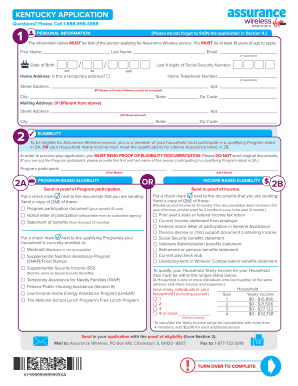
Filling out the Ky999999999999xa form is a straightforward process designed to assist users in applying for Assurance Wireless service. This guide provides step-by-step instructions to ensure that all required information is completed accurately and efficiently.
Follow the steps to successfully complete your application.
- Click 'Get Form' button to access the application form and open it in the editor.
- Begin filling out the personal information section. Provide your first name, last name, email address, date of birth, and the last four digits of your Social Security number. Ensure that this information is accurate since it must correspond to the applicant applying for Assurance Wireless service.
- Input your home address, including the street address and home telephone number. If you have a temporary address, be sure to indicate this as well. Note that PO Boxes or general delivery addresses are not accepted.
- Next, fill out the mailing address if it differs from your home address. Include your city, state, and zip code.
- For eligibility, determine if you or someone in your household participates in a qualifying program or if your household yearly income meets Lifeline Assistance qualifications. Indicate the eligibility type by checking the appropriate section.
- If you select program-based eligibility, provide the first and last name of the program participant and upload proof of participation. This may include a benefit ID card or official letter.
- If opting for income-based eligibility, check the documents you will send as proof of income. Acceptable documents include tax returns, income statements, or benefits statements.
- Create and provide a secure Account PIN, adhering to the specified guidelines for its creation, and choose a secret answer for account security.
- In the signature section, carefully read and confirm the statements listed. Check all three statements, then sign and date the application using blue or black ink. Remember, your application cannot be approved without these checks and your signature.
- Finally, review the application for completeness, ensuring all required fields are filled out, and submit it by the method indicated, either by mailing or faxing specified documents.
Complete your Ky999999999999xa application online today to access Assurance Wireless service.
Your Account PIN is the 6-digit number you created during the Assurance Wireless application process. Customers who receive their phone in the mail will find the Assurance Wireless Account PIN at the top of their Assurance Wireless Welcome Letter.