Loading
Get Dance Class Application Form
How it works
-

Open form follow the instructions
-

Easily sign the form with your finger
-

Send filled & signed form or save
How to fill out the Dance Class Application Form online
This guide provides a comprehensive overview of how to accurately fill out the Dance Class Application Form online. It is designed to assist individuals through each section of the form, ensuring all necessary information is captured clearly and efficiently.
Follow the steps to complete your Dance Class Application Form smoothly.
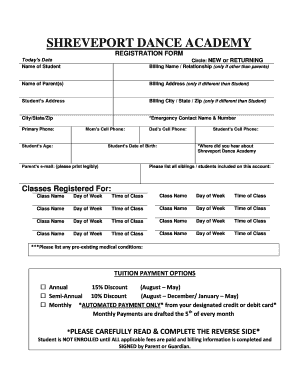
- Click ‘Get Form’ button to obtain the Dance Class Application Form and open it in the editor.
- Begin filling out the form by entering the date you are applying. This helps the academy track registrations based on timing.
- Provide the full name of the student who will be participating in the dance class.
- Indicate whether the student is new or returning by circling the appropriate option.
- If the billing name is different from the parents, please enter the name and relationship here.
- Input the names of the parent(s) associated with the student.
- Fill in the billing address if it differs from the student's address.
- Enter the student's home address, including city, state, and zip code.
- List an emergency contact name and phone number for any urgent situations.
- Provide primary phone numbers for the family, including mother's and father's cell phone numbers.
- Mention the student's age, as this can affect class placement.
- Specify the student's date of birth for enrollment records.
- Enter the parent’s email address legibly to facilitate communication.
- If applicable, include the student's cell phone number for direct contact.
- Indicate how you found out about the Shreveport Dance Academy.
- List all siblings or other students included on this application to ensure proper account management.
- Register for classes by providing the name, day of the week, and time for each class selected.
- Disclose any pre-existing medical conditions that may be relevant for the academy to know.
- Select your preferred tuition payment option by checking the appropriate box, whether it is annual, semi-annual, or monthly.
- Carefully read and sign the payment authorization for automated payments if selecting the monthly option.
- Complete the enrollment section, recognizing that it is contingent upon all fees being paid and the form being signed.
- Once you have filled out all necessary fields, ensure to save changes, download, print, or share the completed form as needed.
Take the next step towards your dance journey by completing your Dance Class Application Form online today!
How do I invite her to dance? There are two main ways of inviting: The direct approach: You walk right up to the person you would like to invite, and ask if they'd like to dance. The subtle approach: You use Cabeceo or Mirada; make eye-contact, give a quick nod, and make your invitation long-distance.
Industry-leading security and compliance
US Legal Forms protects your data by complying with industry-specific security standards.
-
In businnes since 199725+ years providing professional legal documents.
-
Accredited businessGuarantees that a business meets BBB accreditation standards in the US and Canada.
-
Secured by BraintreeValidated Level 1 PCI DSS compliant payment gateway that accepts most major credit and debit card brands from across the globe.