Loading
Get Downey Adult School
How it works
-

Open form follow the instructions
-

Easily sign the form with your finger
-

Send filled & signed form or save
How to fill out the Downey Adult School online
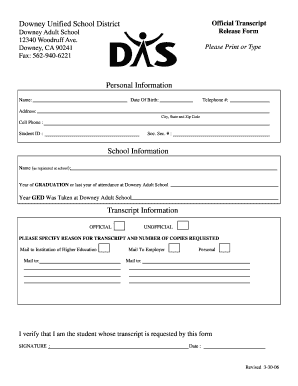
This guide provides clear instructions on completing the Downey Adult School official transcript release form online. Follow the steps carefully to ensure accurate submission of your request for transcripts.
Follow the steps to complete the transcript release form online.
- Select the ‘Get Form’ button to acquire the official transcript release form and open it for editing.
- Enter your personal information by providing your full name, date of birth, and telephone number in the designated fields.
- Fill out your address, including city, state, and zip code. Additionally, provide your cell phone number and student ID as requested.
- For school information, indicate the name you are registered under at the Downey Adult School, as well as the year you graduated or the last year you attended.
- Specify the year you took the GED at Downey Adult School.
- Choose between ‘official’ or ‘unofficial’ transcript by marking the appropriate option.
- Please specify the reason for the transcript request and the number of copies needed. Indicate the recipient, such as an institution of higher education, employer, or for personal use.
- Review the information you have entered to ensure its accuracy. Sign and date the form to verify that you are the student making the transcript request.
- After completing the form, save your changes. You can then download, print, or share the completed document as needed.
Complete your transcript release form online today to ensure a swift processing of your request.
An LPN/LVN certificate program usually takes 1 year to complete, including 500 to 750+ hours of requisite clinical experience depending on state requirements.