Loading
Get Form 10f
How it works
-

Open form follow the instructions
-

Easily sign the form with your finger
-

Send filled & signed form or save
How to fill out the Form 10f online
Form 10f is an essential document used for providing specific information under the Income-tax Act, 1961. This guide will offer you a step-by-step approach to effectively fill out Form 10f online.
Follow the steps to complete Form 10f with ease.
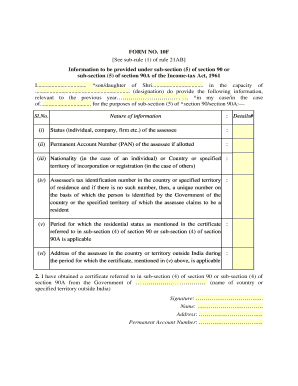
- Click the ‘Get Form’ button to obtain the form and open it in the editor.
- In the first section, provide your name and the name of your father or guardian as appropriate, along with your designation.
- Fill in the previous year relevant to your case for accurate record-keeping.
- For the nature of information, specify your status—whether you are an individual, company, firm, or other classifications.
- Input your Permanent Account Number (PAN) in the designated field if it has been allotted.
- Indicate your nationality if you are an individual, or the country or specified territory of incorporation or registration if you are representing an entity.
- In the following section, provide your tax identification number from your country of residence. If unavailable, include a unique identification number provided by your government.
- State the period for which your residential status is applicable as per the certificate referenced in the form.
- Include your address in the country or territory outside India for the duration specified in the previous section.
- Ensure you attach or obtain the required certificate mentioned in sub-section (4) of section 90 or 90A from the relevant government authority.
- Finally, provide your signature, name, and address at the end of the document alongside your Permanent Account Number.
- When you have completed the form, save your changes, and consider downloading, printing, or sharing the form as necessary.
Complete your Form 10f online today to ensure a smooth filing process.
Provide your residency and tax identification information. ... Print and sign your form. ... File your form with your tax return. ... Maintain documentation of the information provided.